<?xml version="1.0" encoding="utf-8"?><feed xmlns="http://www.w3.org/2005/Atom" ><generator uri="https://jekyllrb.com/" version="3.10.0">Jekyll</generator><link href="https://www.shawenyao.com/feed.xml" rel="self" type="application/atom+xml" /><link href="https://www.shawenyao.com/" rel="alternate" type="text/html" /><updated>2026-01-08T05:46:04+00:00</updated><id>https://www.shawenyao.com/feed.xml</id><title type="html">Wenyao</title><subtitle>A drifter, off to see the world</subtitle><entry><title type="html">What’s on My Desk</title><link href="https://www.shawenyao.com/Whats-on-My-Desk/" rel="alternate" type="text/html" title="What’s on My Desk" /><published>2026-01-07T00:00:00+00:00</published><updated>2026-01-07T00:00:00+00:00</updated><id>https://www.shawenyao.com/Whats-on-My-Desk</id><content type="html" xml:base="https://www.shawenyao.com/Whats-on-My-Desk/"><![CDATA[<p>As of today.</p>
<p float="left" align="middle">
  <img src="https://shawenyao.github.io/Photos/Desktop/0W4A6871.JPG" />
</p>

<p><br /></p>

<p>I consider it my lifetime mission to find the optimal desktop setup from both a productivity and aesthetic standpoint. There are two basic requirements: to maximize space utilization (especially vertically) and to minimize visual clutter (no visible cables, please). In other words, I need everything I need to be exactly where i need it to be, and everything else out of the way. It’s a project that by definition will never see an end, but after years of trying, failing and repeating, at least here’s something that makes me go, hey, I really wouldn’t mind spending ten hours here a day, 7 days a week.</p>

<p float="left" align="middle">
  <img src="https://shawenyao.github.io/Photos/Desktop/0W4A6885.JPG" />
</p>

<p>1. <strong>BenQ ScreenBar Halo 2 LED Monitor Light Bar</strong> - main source of lighting</p>

<p>2. <strong>LG UltraFine 32UP83A</strong> - main monitor</p>

<p><br /></p>

<p float="left" align="middle">
  <img src="https://shawenyao.github.io/Photos/Desktop/0W4A6882.JPG" />
</p>

<p>3. <strong>Dell UltraSharp U2515H</strong> - secondary monitor (potrait orientation)</p>

<p>4. <strong>Sadness mug</strong> - any mug works, but I just cannot resist the gloomy, chubby face</p>

<p>5. <strong>Das Keyboard 4 Professional</strong> - the oldest piece of hardware in the lineup; still going strong in its 9th year</p>

<p>6. <strong>Logitech G604</strong> - the perfect balance between style and function (however, the fact that this particular model has been discontinued concerns me)</p>

<p><br /></p>

<p float="left" align="middle">
  <img src="https://shawenyao.github.io/Photos/Desktop/0W4A6878.JPG" />
</p>

<p>7. <strong>Lisen Gooseneck Phone Holder</strong> - puts the distractions where they belong</p>

<p>8. <strong>iPhone 14 Pro</strong> - doubles as a webcam</p>

<p>9. <strong>ThinkPad X1 Carbon</strong> - work laptop</p>

<p>10. <strong>Asus ROG Zephyrus M16</strong> - peronsal laptop; the lids of both laptops are in permanent closed position</p>

<p>11. <strong>Fezibo standing desk</strong> - useful in more ways than one: staying active, reducing back pain, saving space (chair can go under), etc.</p>

<p><br /></p>

<p float="left" align="middle">
  <img src="https://shawenyao.github.io/Photos/Desktop/0W4A6874.JPG" />
</p>

<p>12. <strong>Lego minifigure stand</strong> - display for a seasonally rotating minifigure; also doubles as an extra monitor arm to prevent wobbling</p>

<p>13. <strong>USB switch</strong> - a hardware shortcut to reconnect keyboard/mouse to the other computer</p>

<p><br /></p>

<p float="left" align="middle">
  <img src="https://shawenyao.github.io/Photos/Desktop/0W4A6880.JPG" />
</p>

<p>14. <strong>Light bar controller</strong> - not an absolute necessity, but looks slick so I don’t mind</p>

<p>15. <strong>Baseus Bass BP1 Pro</strong> - an astonishingly affordable alternative to AirPods Pro</p>

<p><br /></p>

<p float="left" align="middle">
  <img src="https://shawenyao.github.io/Photos/Desktop/0W4A6886.JPG" />
</p>

<p>16. <strong>Nintendo Switch 2</strong> - (I swear it’s not always there)</p>

<p>17. <strong>USB-C cable w/ magnetic adaptor</strong> - makes plugging/unplugging a one-handed operation; also doubles as a Switch 2 dock/fast charger</p>

<p><br /></p>

<div align="center">
  <img src="https://shawenyao.github.io/Photos/Desktop/IMG_5480.gif" style="width:100%;height:auto;" />
</div>

<p><em>Magnetically attached USB-C dongle - the best thing that has happened to USB since USB-C in my opinion</em></p>]]></content><author><name></name></author><category term="random" /><category term="smart home" /><summary type="html"><![CDATA[As of today.]]></summary></entry><entry><title type="html">Hello Weisi</title><link href="https://www.shawenyao.com/Hello-Weisi/" rel="alternate" type="text/html" title="Hello Weisi" /><published>2025-08-28T00:00:00+00:00</published><updated>2025-08-28T00:00:00+00:00</updated><id>https://www.shawenyao.com/Hello-Weisi</id><content type="html" xml:base="https://www.shawenyao.com/Hello-Weisi/"><![CDATA[<p>It’s our pleasure to meet you, too.</p>

<p float="left" align="middle">
  <img src="https://shawenyao.github.io/Photos/Random/wg.jpg" />
</p>

<p><br /></p>

<p>Hello Weisi,</p>

<p>With your first cry, we welcome you to this world. There’s a lot to take in. We know it must be so confusing, overwhelming and disorienting. After all, you have been living in a dark, warm crib for the past nine and half months. What is with this weird, new place?</p>

<p><a href="https://www.shawenyao.com/Hello-Weiyi/">Weiyi</a>, your older brother, had a similar experience two and a half years ago. Look where he is now. It won’t be easy, but it will be fine. And did we mention that you are in luck? This time around, we are now what you might call experienced parents (or less inexperienced ones, at least). Gone are the clueless diaper changers. No more clumsy swaddle makers. Nor the frypan-burning chefs. We are proud to say that we know what we are doing today, hopefully.</p>

<p>But even though we have some clue about what’s going on with you, it doesn’t make it any less special. We will applaud your achievements. Your first smile will be savored for days to come. Your first word will result in another heated debate over whether it means dad or mom. Your first steps will be recorded at the highest definition possible just so that we can show every excruciating detail to anyone who cares to watch. Most importantly, we look forward to learning new ways of becoming better parents with you.</p>

<p>You joined our family today - for that, we will be forever grateful. We cannot begin to tell you how magical the feeling is to have the inevitability of our aging accompanied by the delight of watching you grow. You have a beautiful life ahead of you. Make the most of it.</p>

<p>Yours,</p>

<p>Mom and Dad</p>]]></content><author><name></name></author><category term="random" /><summary type="html"><![CDATA[It’s our pleasure to meet you, too.]]></summary></entry><entry><title type="html">Three-Body Problem</title><link href="https://www.shawenyao.com/Three-Body-Problem/" rel="alternate" type="text/html" title="Three-Body Problem" /><published>2024-06-06T00:00:00+00:00</published><updated>2024-06-06T00:00:00+00:00</updated><id>https://www.shawenyao.com/Three-Body-Problem</id><content type="html" xml:base="https://www.shawenyao.com/Three-Body-Problem/"><![CDATA[<p>Planetary motions on a microcontroller.</p>

<div align="center">
  <img src="https://shawenyao.github.io/Photos/Three Body/image.png" style="width:100%;height:auto;" />
</div>

<h2 id="requirements">Requirements</h2>
<ul>
  <li><a href="https://www.raspberrypi.com/products/raspberry-pi-pico/">Raspberry Pi Pico</a> x 1</li>
  <li>Breadboard x 1</li>
  <li>Male-to-male jump wires x 4</li>
  <li>128x64 OLED Display x 1</li>
  <li>Micro-USB  cable x 1</li>
  <li>Power adapter or power bank x 1</li>
</ul>

<h2 id="instructions">Instructions</h2>
<ul>
  <li>Connect the OLED display to the Raspberry Pi Pico on a breadboard</li>
  <li>Download and flash the <a href="https://github.com/v923z/micropython-builder/releases">MicroPython firmware</a></li>
  <li>Copy <a href="https://github.com/shawenyao/three-body/blob/main/main.py">main.py</a> onto the Raspberry Pi Pico</li>
  <li>Connect the Raspberry Pi Pico to a power source</li>
</ul>

<h2 id="demo">Demo</h2>

<video src="https://shawenyao.github.io/Photos/Three Body/demo.mp4" controls="controls" width="100%"></video>

<h2 id="references">References</h2>
<ul>
  <li>Problem overview by <a href="https://en.wikipedia.org/wiki/Three-body_problem">Wikipedia</a></li>
  <li>Python solution by <a href="https://blbadger.github.io/3-body-problem.html">Benjamin Badge</a></li>
  <li>Initial conditions based on <a href="https://observablehq.com/@rreusser/periodic-planar-three-body-orbits">Ricky Reusser</a></li>
</ul>]]></content><author><name></name></author><category term="raspberry pi" /><category term="maths" /><category term="python" /><summary type="html"><![CDATA[Planetary motions on a microcontroller.]]></summary></entry><entry><title type="html">Where Is My Package</title><link href="https://www.shawenyao.com/Where-Is-My-Package/" rel="alternate" type="text/html" title="Where Is My Package" /><published>2023-10-30T00:00:00+00:00</published><updated>2023-10-30T00:00:00+00:00</updated><id>https://www.shawenyao.com/Where-Is-My-Package</id><content type="html" xml:base="https://www.shawenyao.com/Where-Is-My-Package/"><![CDATA[<p>An Amazon, UPS, and Leasing Office Mystery</p>

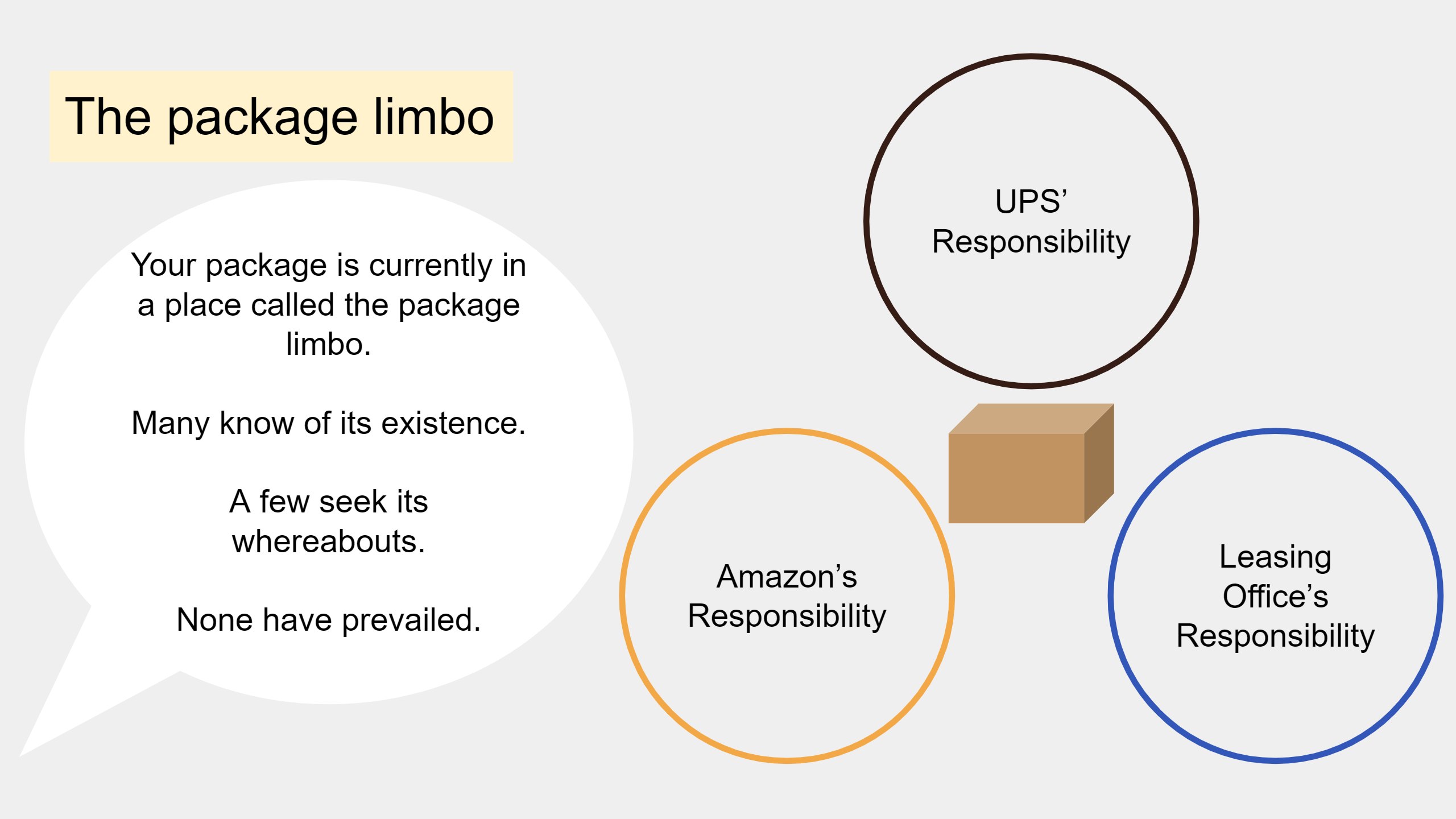
<div align="center">
  <img src="https://shawenyao.github.io/Photos/Where Is My Package/1.png" />
</div>

<div align="center">
  <img src="https://shawenyao.github.io/Photos/Where Is My Package/2.png" />
</div>

<div align="center">
  <img src="https://shawenyao.github.io/Photos/Where Is My Package/3.png" />
</div>

<div align="center">
  <img src="https://shawenyao.github.io/Photos/Where Is My Package/4.png" />
</div>

<div align="center">
  <img src="https://shawenyao.github.io/Photos/Where Is My Package/5.png" />
</div>

<div align="center">
  <img src="https://shawenyao.github.io/Photos/Where Is My Package/6.png" />
</div>

<div align="center">
  <img src="https://shawenyao.github.io/Photos/Where Is My Package/7.png" />
</div>]]></content><author><name></name></author><category term="random" /><category term="story on slides" /><summary type="html"><![CDATA[An Amazon, UPS, and Leasing Office Mystery]]></summary></entry><entry><title type="html">Double Pack</title><link href="https://www.shawenyao.com/Double-Pack/" rel="alternate" type="text/html" title="Double Pack" /><published>2023-08-25T00:00:00+00:00</published><updated>2023-08-25T00:00:00+00:00</updated><id>https://www.shawenyao.com/Double-Pack</id><content type="html" xml:base="https://www.shawenyao.com/Double-Pack/"><![CDATA[<p>A Walgreens Mystery</p>

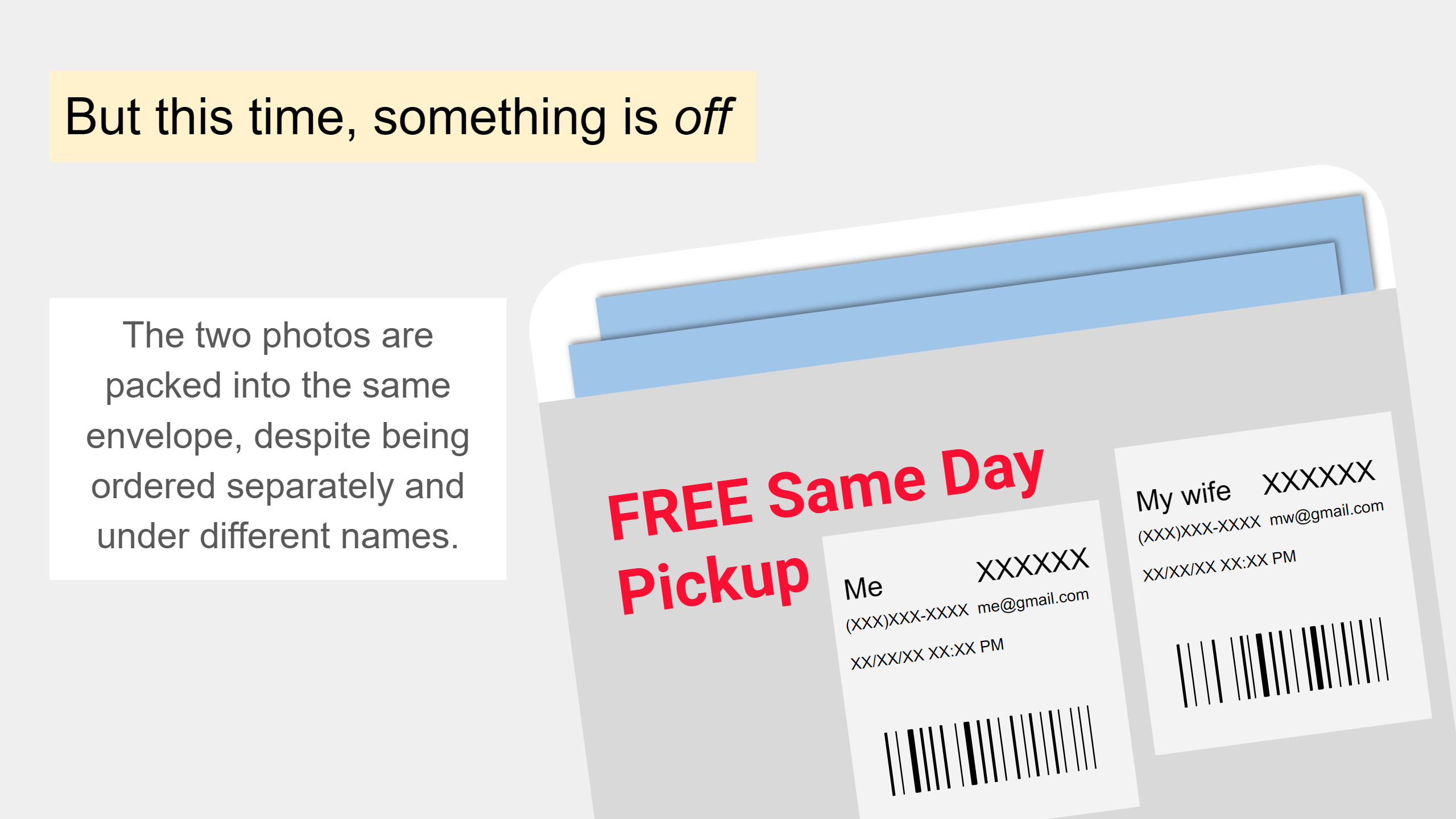
<div align="center">
  <img src="https://shawenyao.github.io/Photos/Double Pack/1.png" />
</div>

<div align="center">
  <img src="https://shawenyao.github.io/Photos/Double Pack/2.png" />
</div>

<div align="center">
  <img src="https://shawenyao.github.io/Photos/Double Pack/3.png" />
</div>

<div align="center">
  <img src="https://shawenyao.github.io/Photos/Double Pack/4.png" />
</div>

<div align="center">
  <img src="https://shawenyao.github.io/Photos/Double Pack/5.png" />
</div>

<div align="center">
  <img src="https://shawenyao.github.io/Photos/Double Pack/6.png" />
</div>

<div align="center">
  <img src="https://shawenyao.github.io/Photos/Double Pack/7.png" />
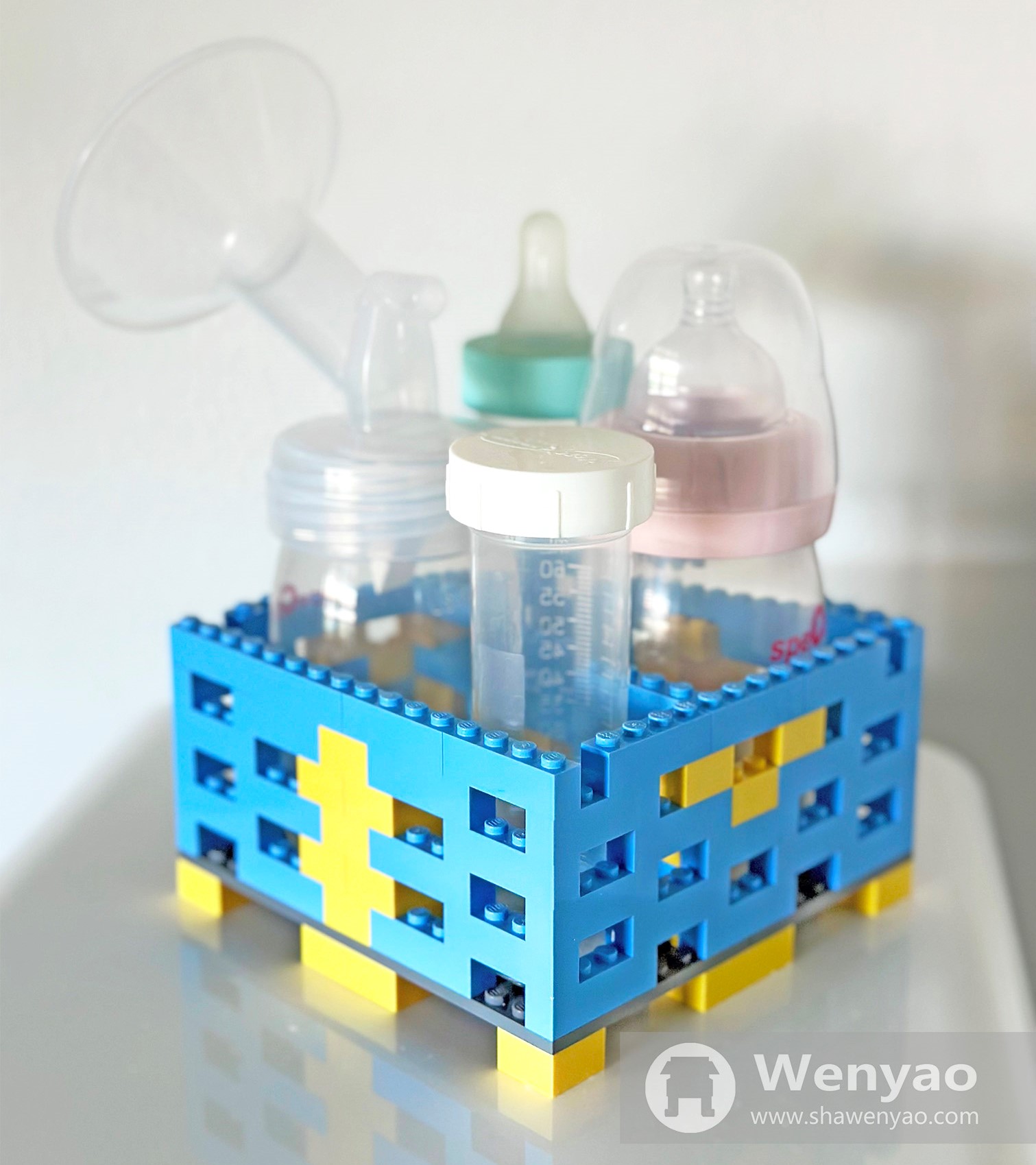
</div>]]></content><author><name></name></author><category term="random" /><category term="story on slides" /><summary type="html"><![CDATA[A Walgreens Mystery]]></summary></entry><entry><title type="html">Lego Baby Bottle Stand</title><link href="https://www.shawenyao.com/Lego-Baby-Bottle-Stand/" rel="alternate" type="text/html" title="Lego Baby Bottle Stand" /><published>2023-04-26T00:00:00+00:00</published><updated>2023-04-26T00:00:00+00:00</updated><id>https://www.shawenyao.com/Lego-Baby-Bottle-Stand</id><content type="html" xml:base="https://www.shawenyao.com/Lego-Baby-Bottle-Stand/"><![CDATA[<p>Mommy is the best - period. Meanwhile, daddy has been trying to help.</p>

<div align="center">
  <img src="https://shawenyao.github.io/Photos/Lego Baby Bottle Stand/final.jpg" />
</div>

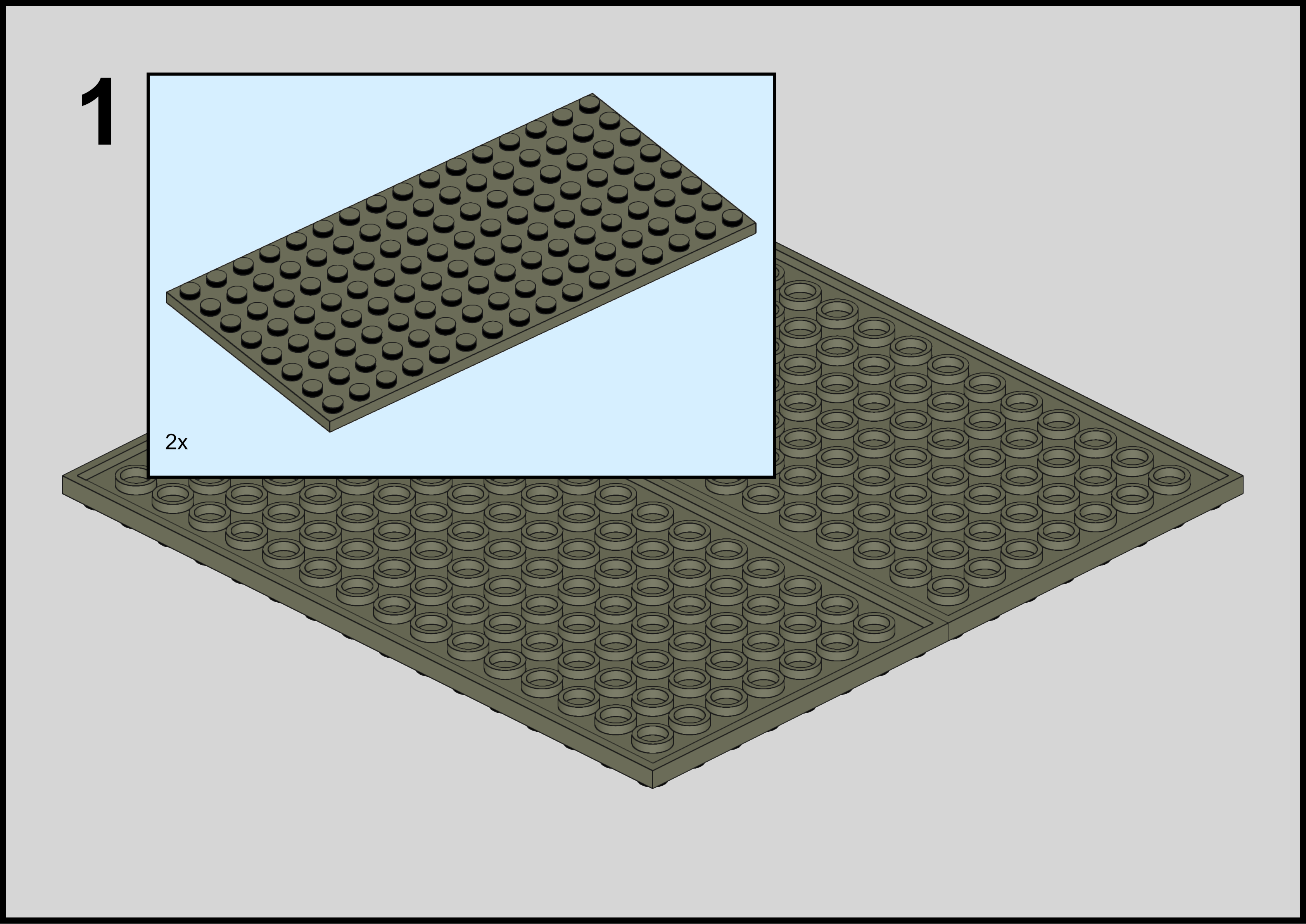
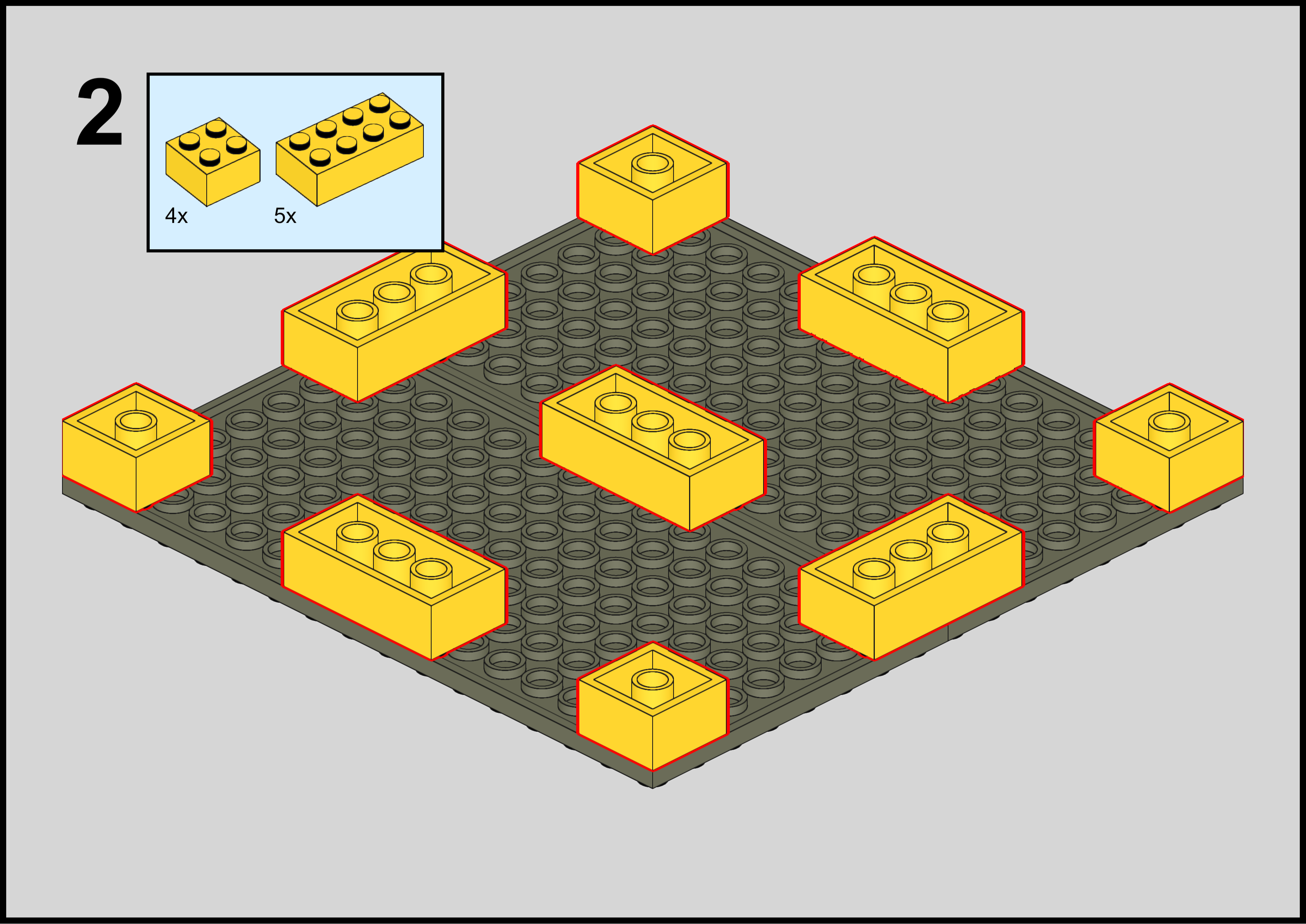
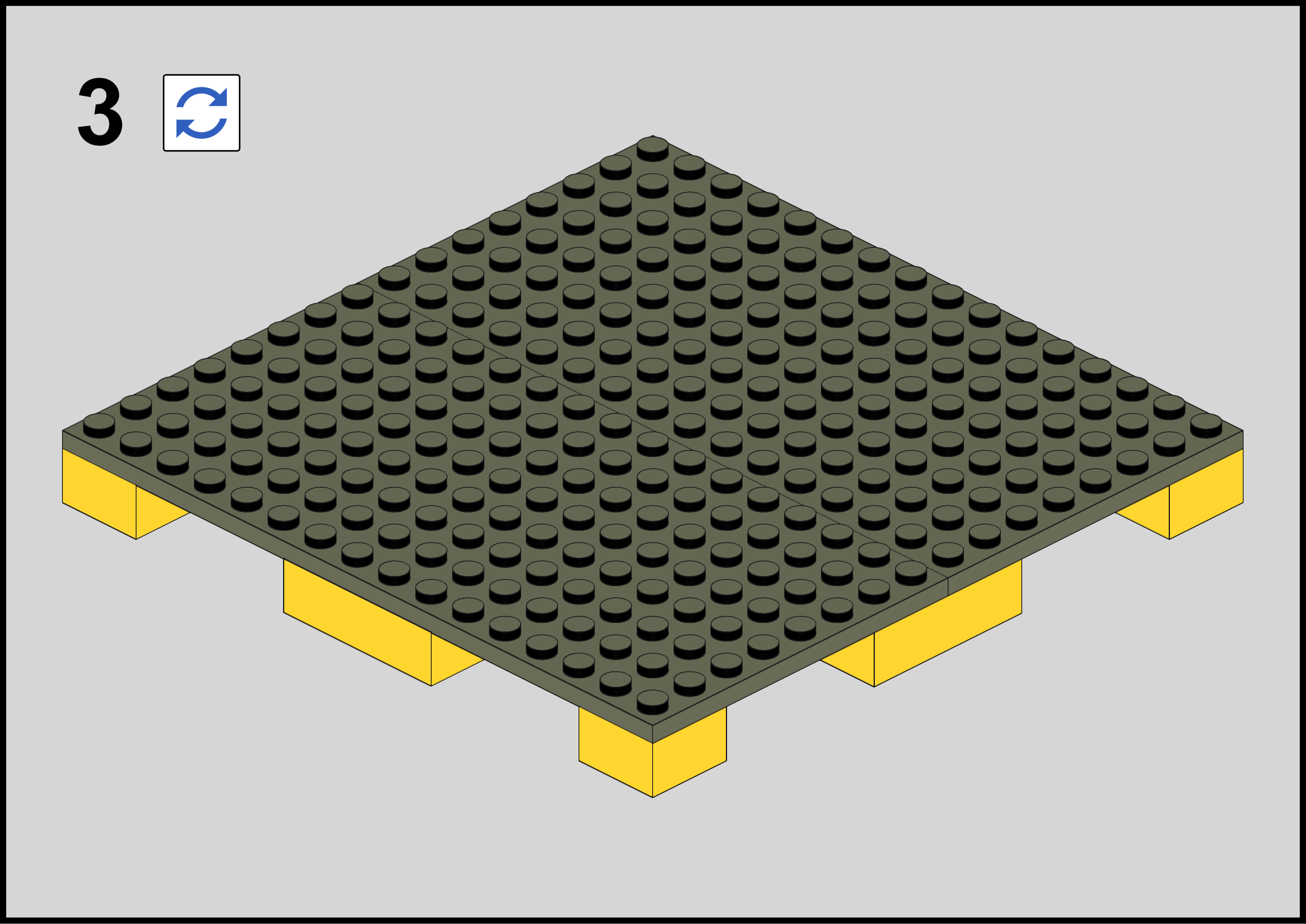
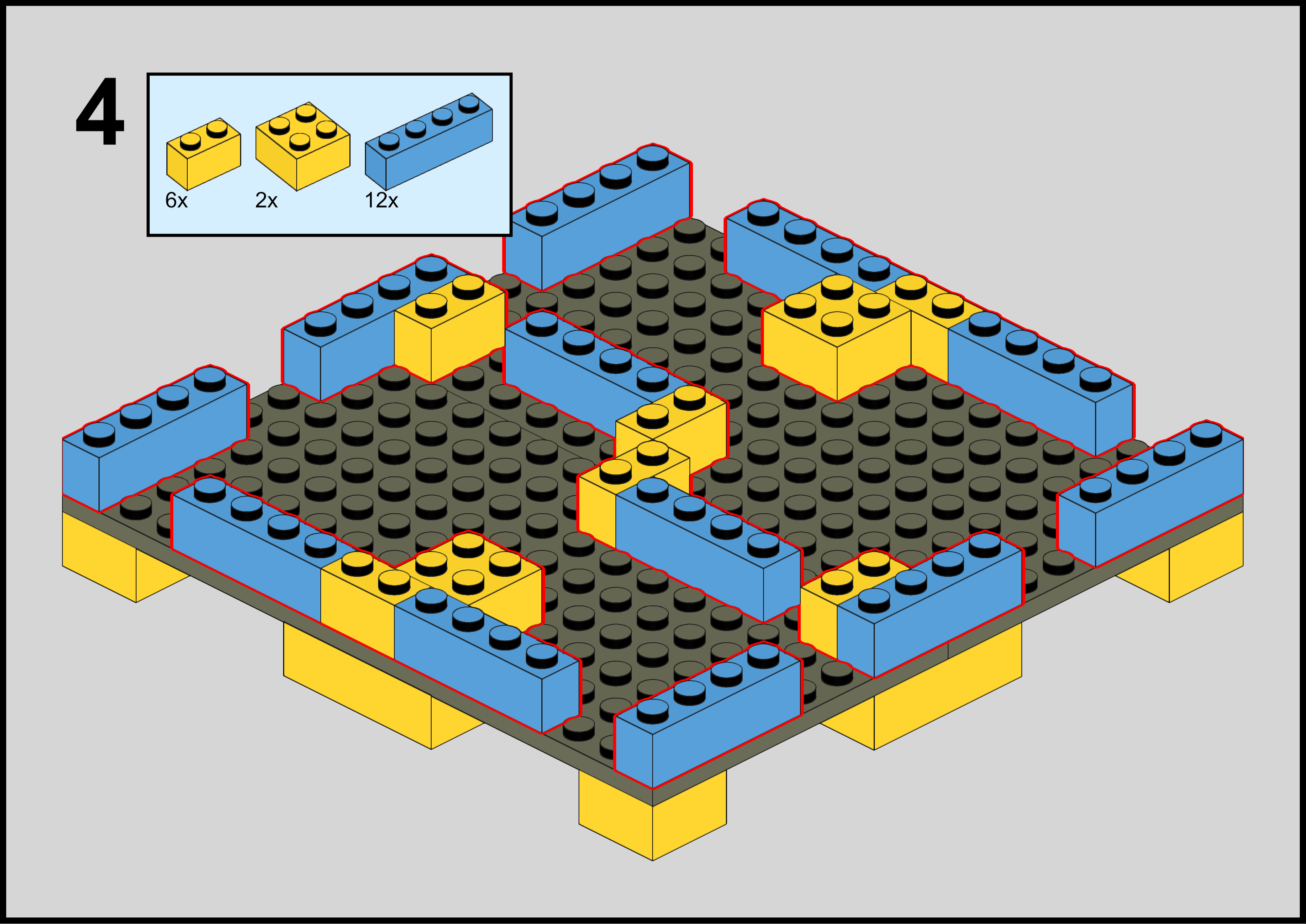
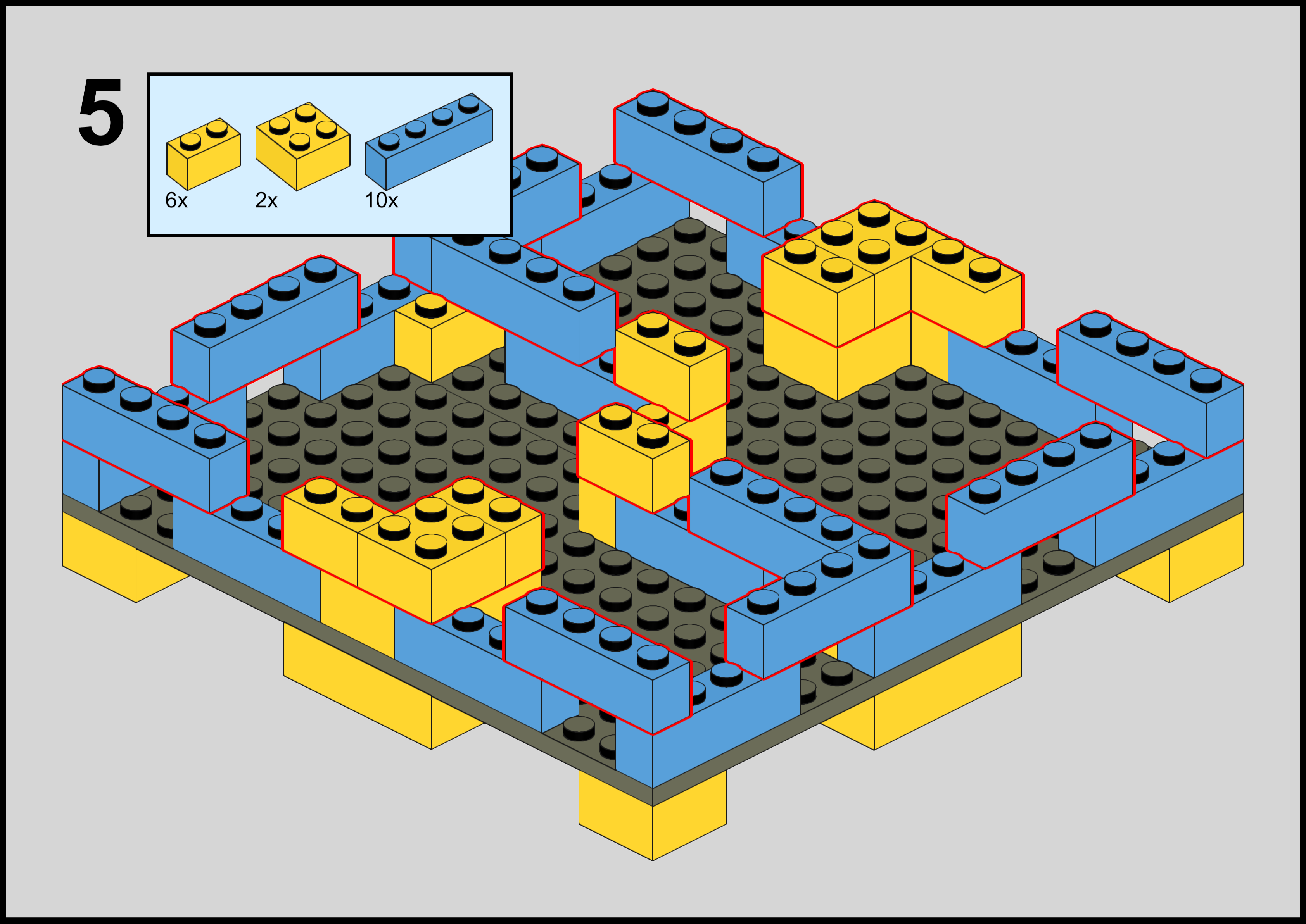
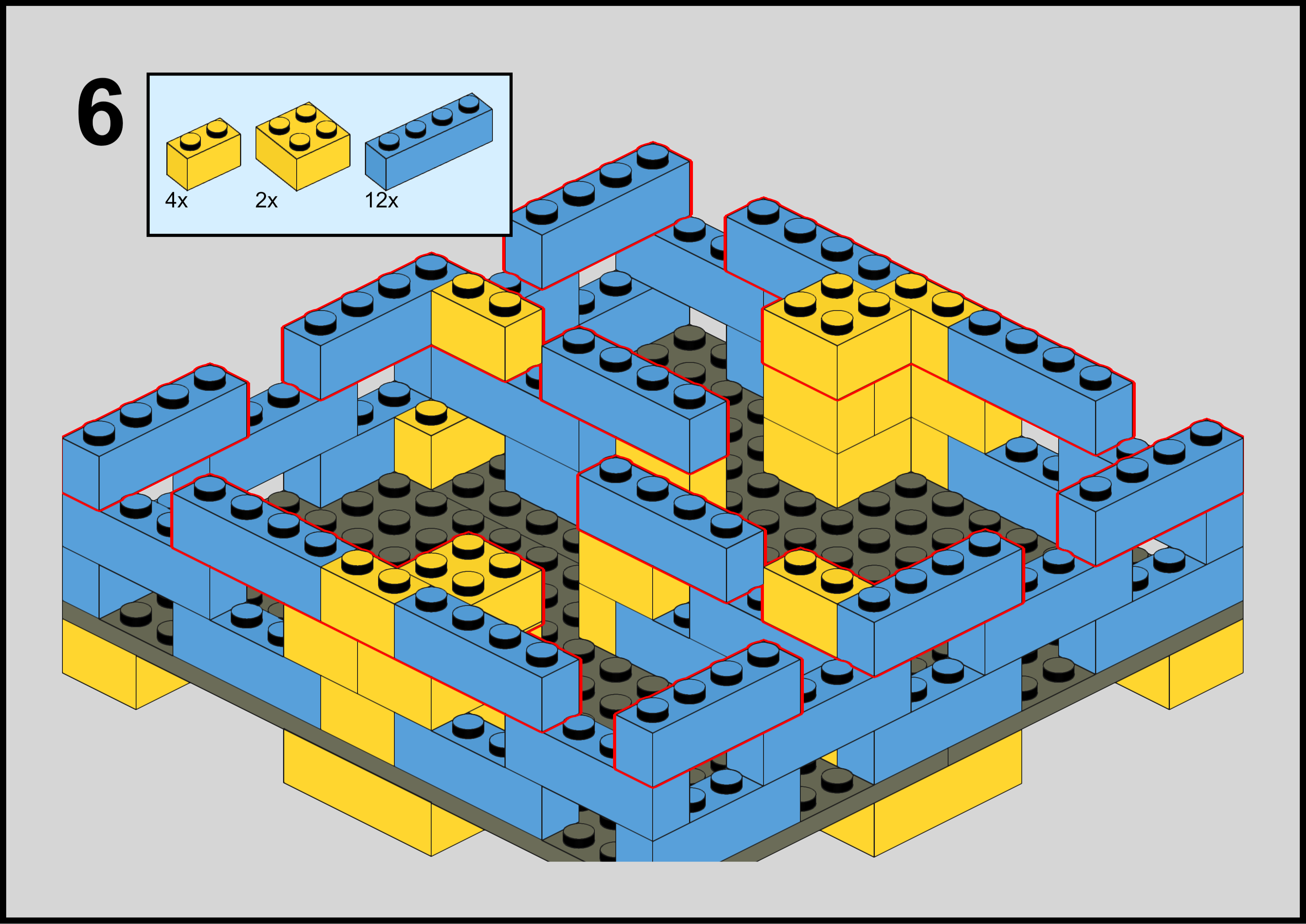
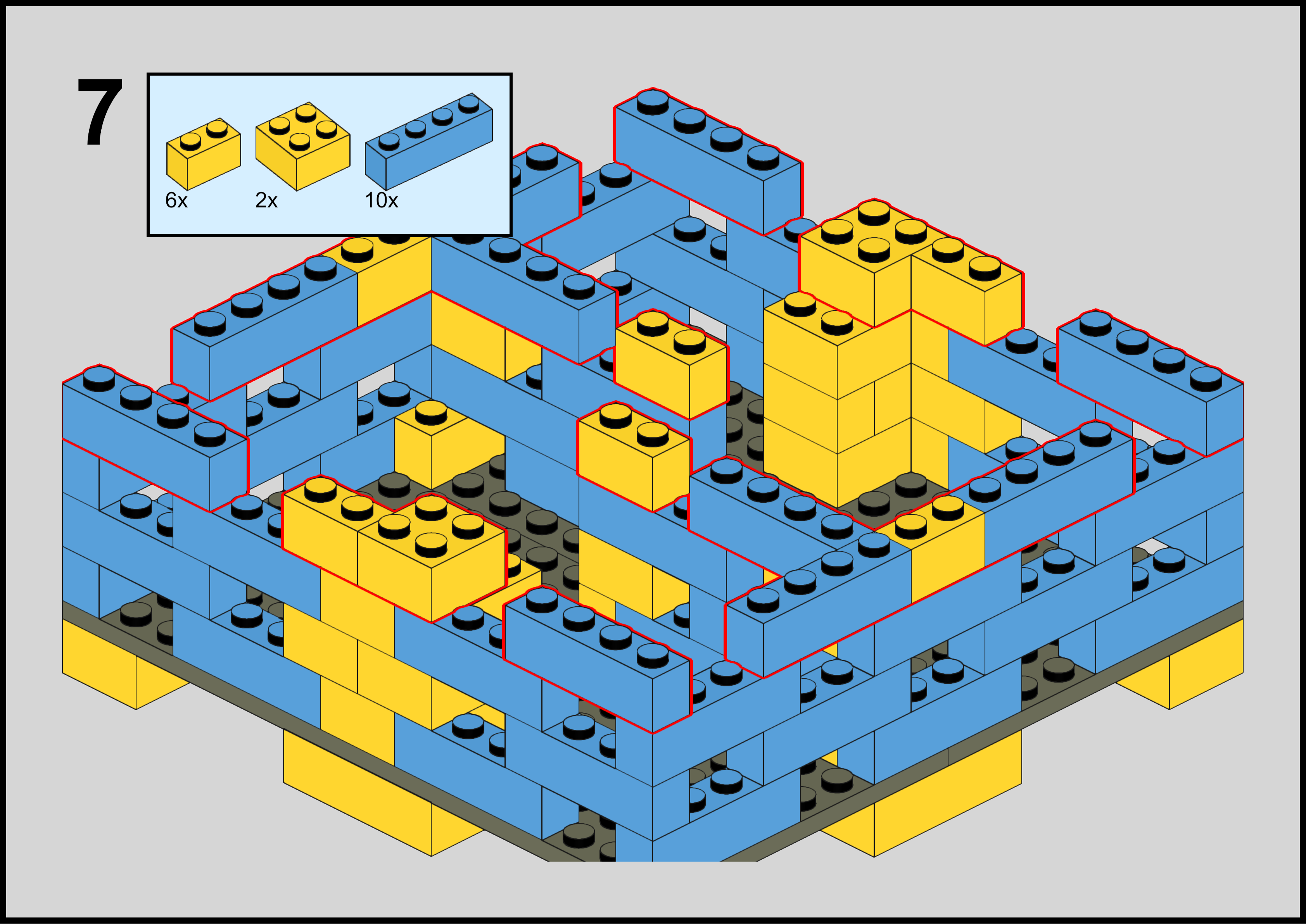
<h2 id="instructions">Instructions</h2>
<div align="center">
  <img src="https://shawenyao.github.io/Photos/Lego Baby Bottle Stand/1_2x.png" />
</div>

<div align="center">
  <img src="https://shawenyao.github.io/Photos/Lego Baby Bottle Stand/2_2x.png" />
</div>

<div align="center">
  <img src="https://shawenyao.github.io/Photos/Lego Baby Bottle Stand/3_2x.png" />
</div>

<div align="center">
  <img src="https://shawenyao.github.io/Photos/Lego Baby Bottle Stand/4_2x.png" />
</div>

<div align="center">
  <img src="https://shawenyao.github.io/Photos/Lego Baby Bottle Stand/5_2x.png" />
</div>

<div align="center">
  <img src="https://shawenyao.github.io/Photos/Lego Baby Bottle Stand/6_2x.png" />
</div>

<div align="center">
  <img src="https://shawenyao.github.io/Photos/Lego Baby Bottle Stand/7_2x.png" />
</div>

<div align="center">
  <img src="https://shawenyao.github.io/Photos/Lego Baby Bottle Stand/8_2x.png" />
</div>

<div align="center">
  <img src="https://shawenyao.github.io/Photos/Lego Baby Bottle Stand/9_2x.png" />
</div>

<div align="center">
  <img src="https://shawenyao.github.io/Photos/Lego Baby Bottle Stand/10_2x.png" />
</div>

<div align="center">
  <img src="https://shawenyao.github.io/Photos/Lego Baby Bottle Stand/11_2x.png" />
</div>

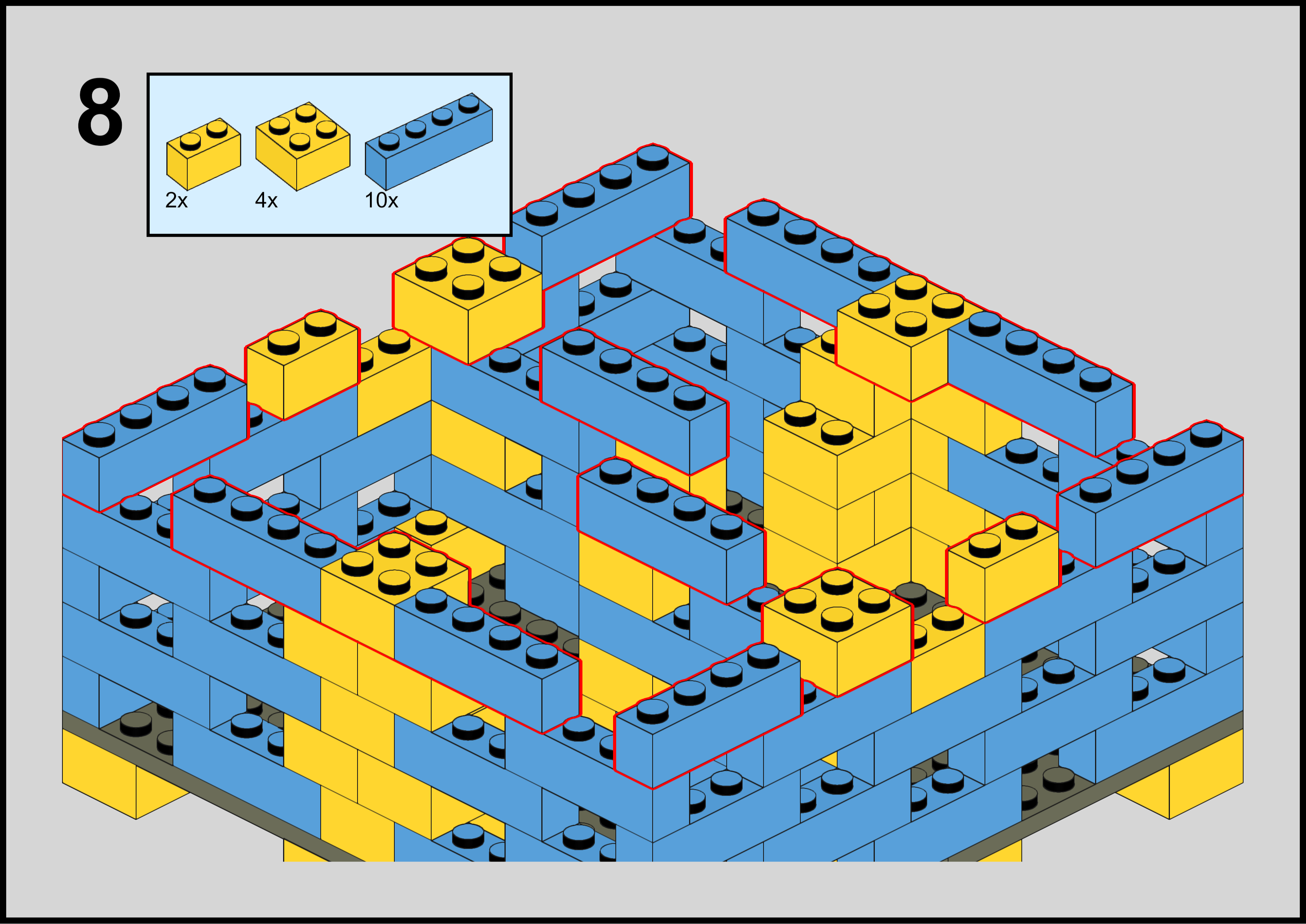
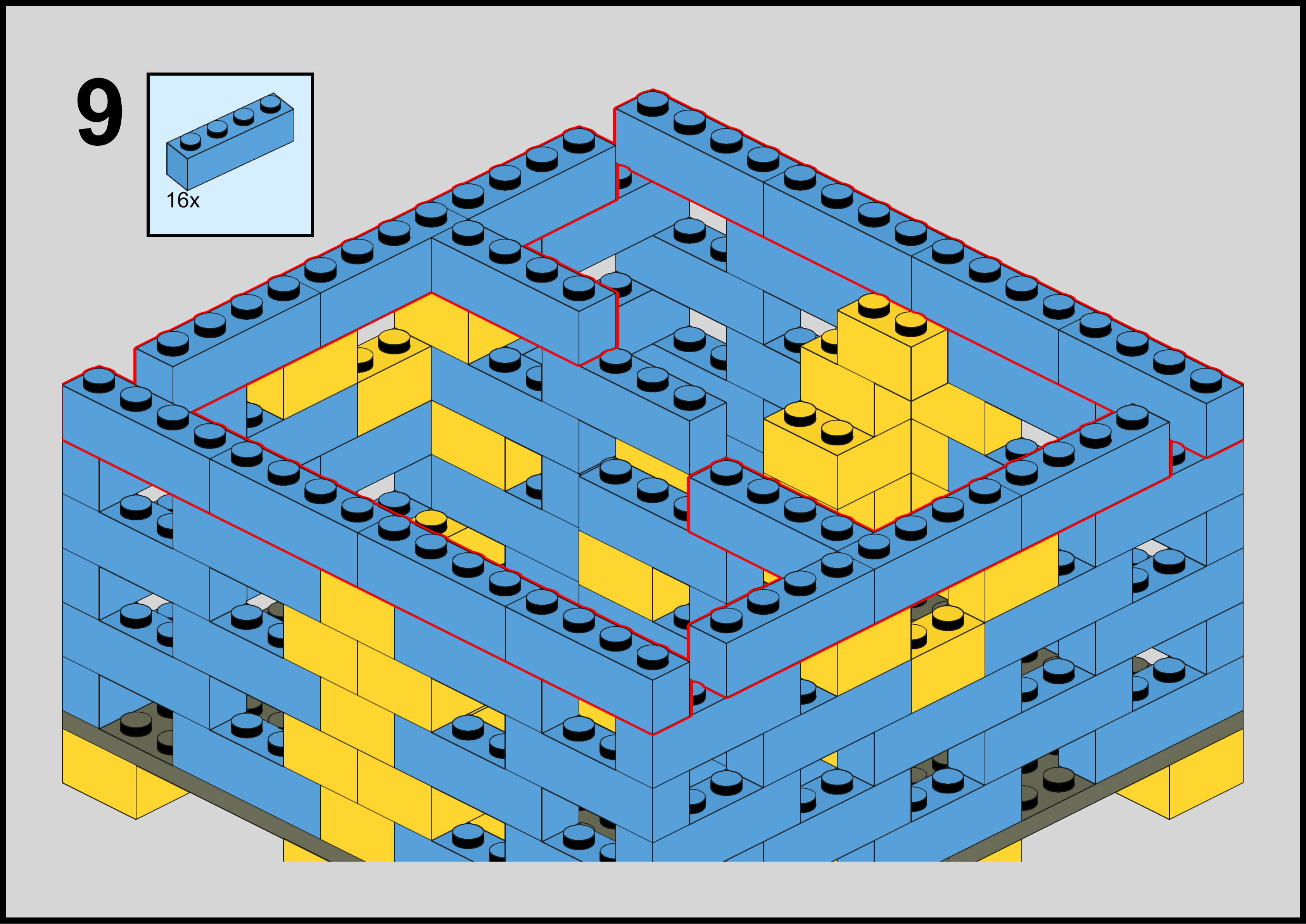
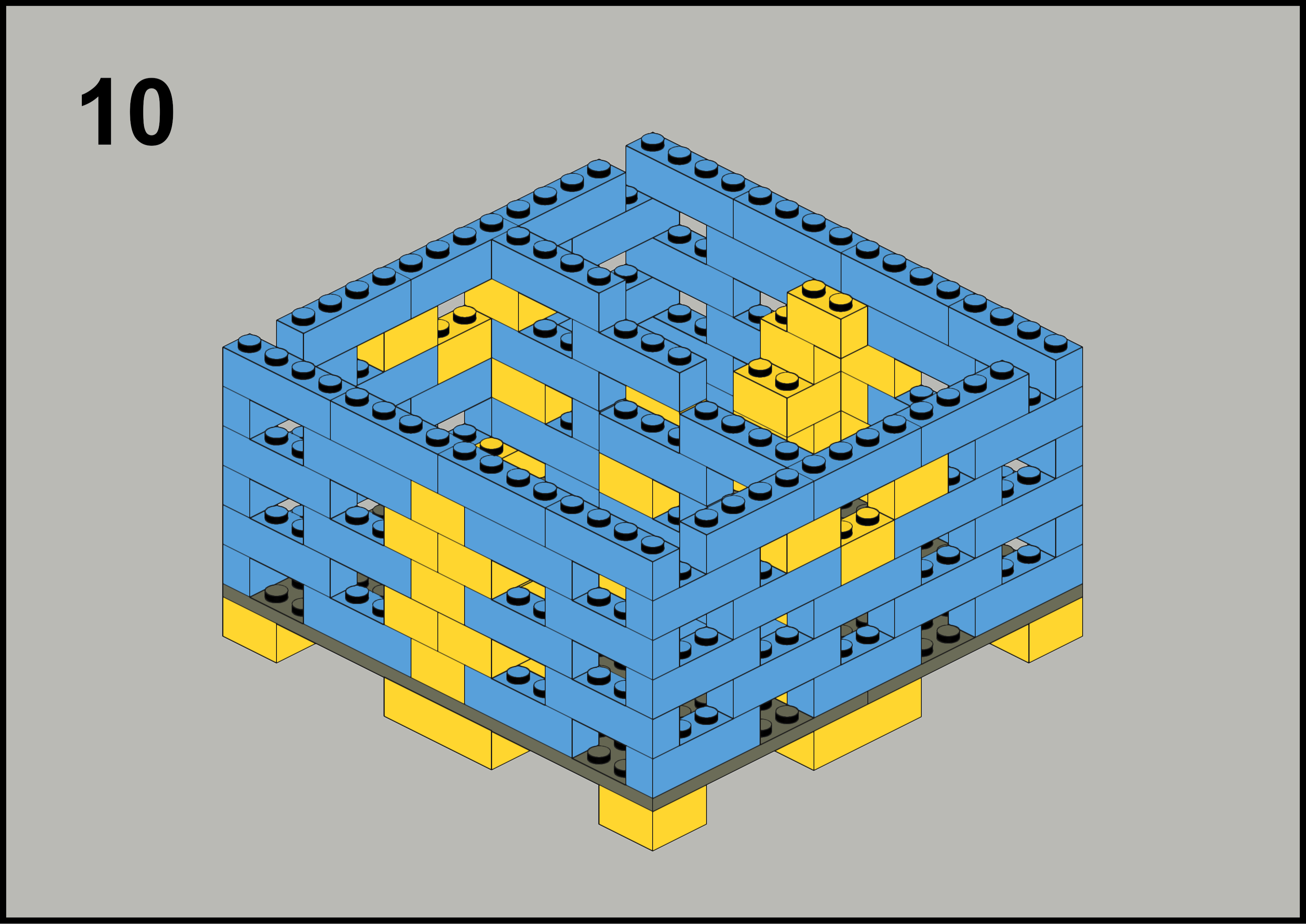
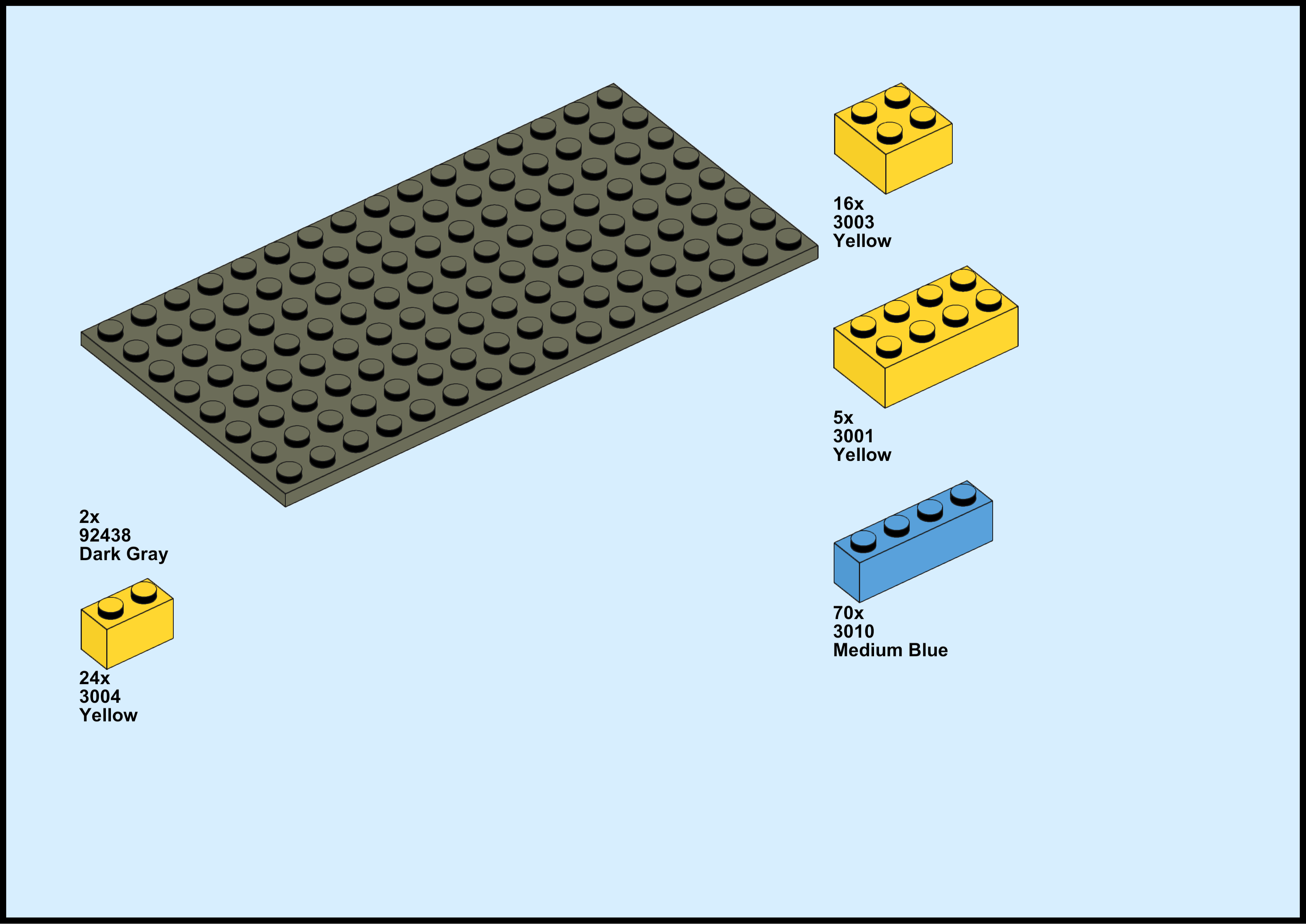
<p>Instructions created with <a href="https://www.bricklink.com/v3/studio/download.page">Bricklink Studio</a>. To download a PDF copy, click <a href="https://shawenyao.github.io/Photos/Lego%20Baby%20Bottle%20Stand/bottle%20stand.pdf">here</a>.</p>]]></content><author><name></name></author><category term="lego" /><category term="moc" /><summary type="html"><![CDATA[Mommy is the best - period. Meanwhile, daddy has been trying to help.]]></summary></entry><entry><title type="html">Hello Weiyi</title><link href="https://www.shawenyao.com/Hello-Weiyi/" rel="alternate" type="text/html" title="Hello Weiyi" /><published>2023-03-20T00:00:00+00:00</published><updated>2023-03-20T00:00:00+00:00</updated><id>https://www.shawenyao.com/Hello-Weiyi</id><content type="html" xml:base="https://www.shawenyao.com/Hello-Weiyi/"><![CDATA[<p>It’s our pleasure to meet you.</p>

<p float="left" align="middle">
  <img src="https://shawenyao.github.io/Photos/Random/ws.jpg" />
</p>

<p><br /></p>

<p>Hello Weiyi,</p>

<p>On a sunny afternoon a little less than 10 months ago, we became aware of your existence. We were thrilled to say the least. A tad uneasy, too. As clueless as we were, we then set off on a journey to prepare ourselves for your arrival. That brings us to, well, today.</p>

<p>Today, we welcome you to this world.</p>

<p>It is a beautiful world. One full of natural wonders and man-made miracles. Right off the bat, you are already a descendant of a 13.8-billion-year-old universe, a 4.5-billion-year-old planet, and a 6000-year-old civilization.<sup>1,2,3</sup> By the time you read this, a lot more surely will have changed. Will humans have become inter-planetary? How much faster will computers run? Will cars be driving themselves, finally? Will you, perhaps, become part of the change, just like we all did today?</p>

<p>Today, we welcome you as the newest member of our small but growing family on Harvey Drive. Mom and Dad are what you might call nice people. Average, nice people. We came from a country across the Pacific Ocean, where your grandparents call home. There’s also Disney the tabby cat, who joined us about 3 years earlier than you did. All of us enjoy keeping each other company, and we will make sure you are no exception.</p>

<p>It is going to be a while before you can make a living on your own - and that’s okay. We as a species are all beneficiaries of our extended childhood. It means possibilities. So, so many of them. There is knowledge to gain, skills to master, places to visit, books to read, music to listen to, movies to watch, games to play… Though we will guide you on what to try first, we want to listen to you. In time, you will learn to make the best arrangements for yourself and take responsibility for your actions. It is your life, after all. As much as we applaud an exciting, accomplished life, a simple, uneventful one can be just as commendable. All we ask of you is to treat everyone kindly and live every day to the fullest.</p>

<p>It is not always going to be easy. You will meet challenges. Insurmountable, hopeless predicaments. There will be pains. Excruciating, heart-wrenching days. You will make choices. Hard, unpopular decisions. But whatever you face and however you deal with it, please remember that on this day, you were born with our utmost love, care and support.</p>

<p>Yours,</p>

<p>Mom and Dad</p>

<p><br /></p>

<p><sup>1</sup> Universe, <em>Wikipedia</em>, <a href="https://en.wikipedia.org/wiki/Universe">https://en.wikipedia.org/wiki/Universe</a>, accessed March 2023.</p>

<p><sup>2</sup> Earth, <em>Wikipedia</em>, <a href="https://en.wikipedia.org/wiki/Earth">https://en.wikipedia.org/wiki/Earth</a>, accessed March 2023.</p>

<p><sup>3</sup> Civilization, <em>Wikipedia</em>, <a href="https://en.wikipedia.org/wiki/Civilization">https://en.wikipedia.org/wiki/Civilization</a>, accessed March 2023.</p>]]></content><author><name></name></author><category term="random" /><summary type="html"><![CDATA[It’s our pleasure to meet you.]]></summary></entry><entry><title type="html">BART Platform Sign Portable</title><link href="https://www.shawenyao.com/BART-Platform-Sign-Portable/" rel="alternate" type="text/html" title="BART Platform Sign Portable" /><published>2023-02-08T00:00:00+00:00</published><updated>2023-02-08T00:00:00+00:00</updated><id>https://www.shawenyao.com/BART-Platform-Sign-Portable</id><content type="html" xml:base="https://www.shawenyao.com/BART-Platform-Sign-Portable/"><![CDATA[<p>An authentic, desktop BART experience.</p>

<div align="center">
  <img src="https://shawenyao.github.io/Photos/BART-OLED/demo.gif" style="width:100%;height:auto;" />
</div>

<p><em>BART Platform Sign Portable in action, train arriving.</em></p>

<p><br /></p>

<p>I like commuting by BART. It’s fast, (relatively) reliable and (mostly) stress-free. Indeed, for the price, there isn’t really a whole lot to complain about. That said, if there has to be one, for me it’s probably going to be about the long wait between trains for some lines. Adding more trains is an obvious solution to the problem, albeit a rather expensive one. Timing the train is another, a much more feasible one at that. In fact, thanks to the BART app or even Google Maps, arrival and schedule info is readily available to inform trip planning. However, sometimes I just wish that there were a BART platform sign right outside my bedroom window. Yes, that would be so cool. Well, so unrealistic, too. Fortunately, the next best thing is very much doable with a little help from a Raspberry Pi Pico W.</p>

<h2 id="bart-platform-sign-the-original">BART Platform Sign, the Original</h2>

<p>Behold the original, real BART platform sign, a piece of display that looks all too familiar to some 145,700 riders (as of <a href="https://en.wikipedia.org/wiki/Bay_Area_Rapid_Transit">Q3 2022</a>) everyday -</p>

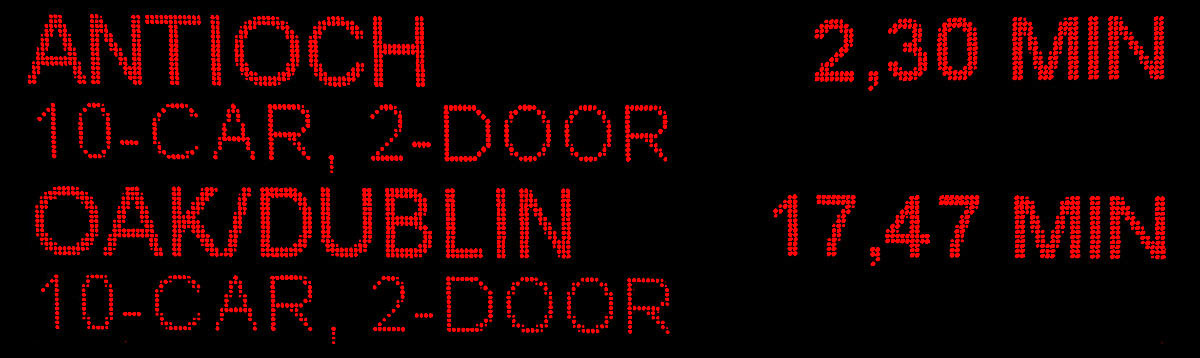
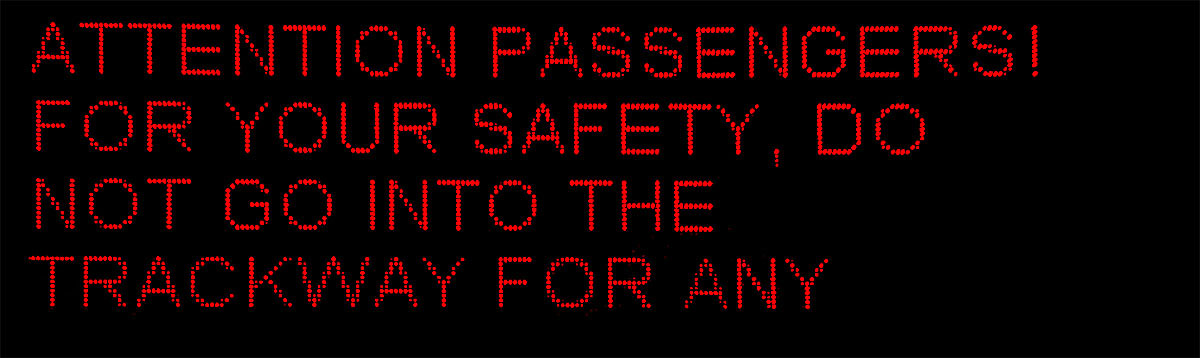
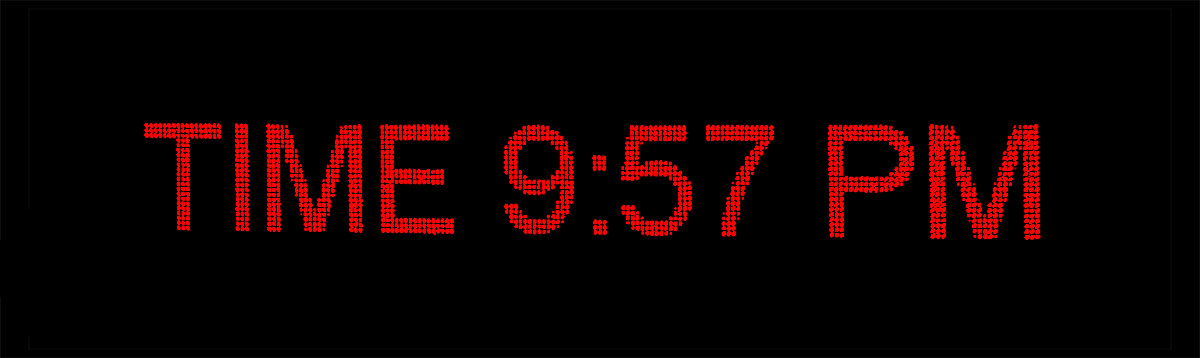
<p float="left" align="middle">
  <img src="https://shawenyao.github.io/Photos/BART-OLED/1.jpg" width="48%" />
  <img src="https://shawenyao.github.io/Photos/BART-OLED/2.jpg" width="48%" /> 
</p>

<p float="left" align="middle">
  <img src="https://shawenyao.github.io/Photos/BART-OLED/3.jpg" width="48%" />
  <img src="https://shawenyao.github.io/Photos/BART-OLED/4.jpg" width="48%" /> 
</p>

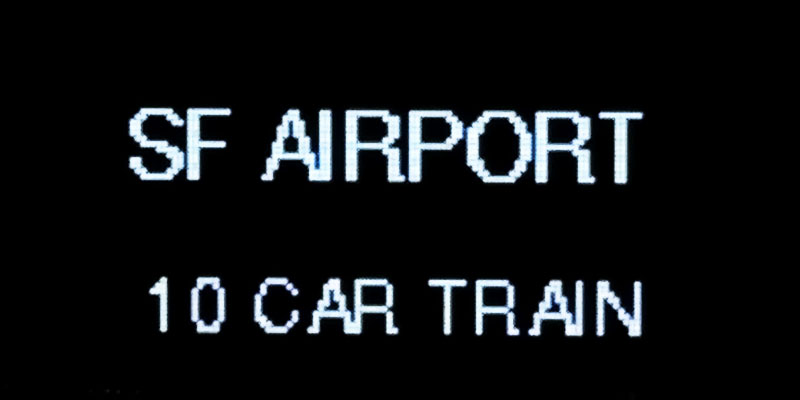
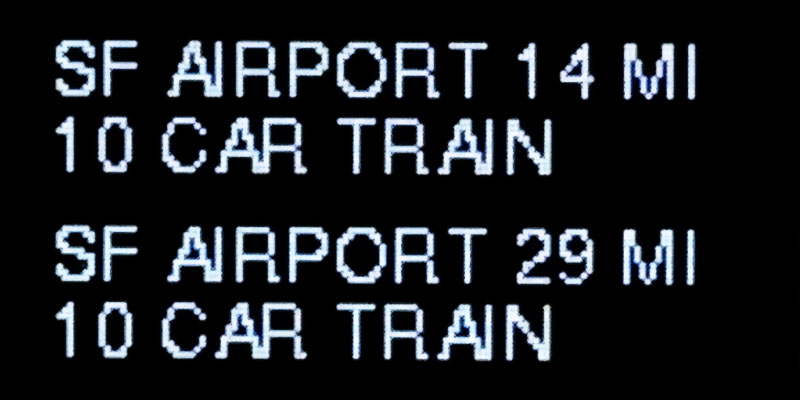
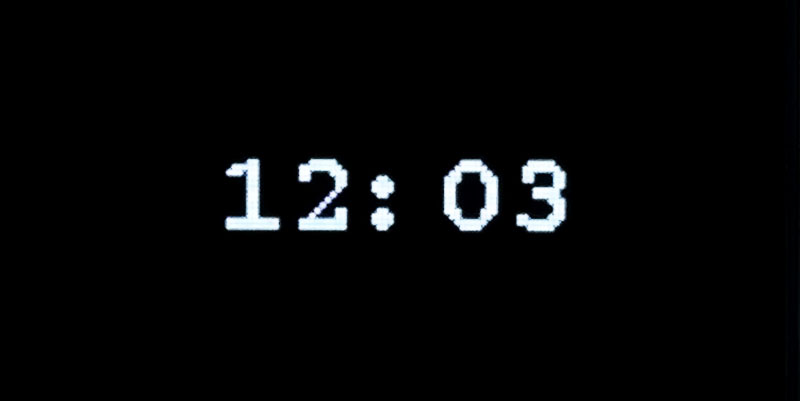
<p><em>Four types of platform sign layouts. Top left: estimated wait time; top right: BART Service Advisories; bottom left: train arriving; bottom right: digital clock.</em></p>

<p>If you stare at it for a while, a pattern begins to emerge. Generally, the sign loops through four different layouts. First, there’s the estimated wait time screen between trains, which can span multiple screens by itself. This is often followed by a second type of layout, BART Service Advisories, usually regarding an announcement of a train outage, cancellation, or just a friendly reminder from the police asking you to pay attention to your belongings. Third, a full-screen display of the destination kicks in when a train enters the platform. Finally, a digital clock pops up from time to time. They are all useful in some way, with the possible exception of the second one which isn’t that informative in my opinion.</p>

<h2 id="connecting-a-display">Connecting a Display</h2>

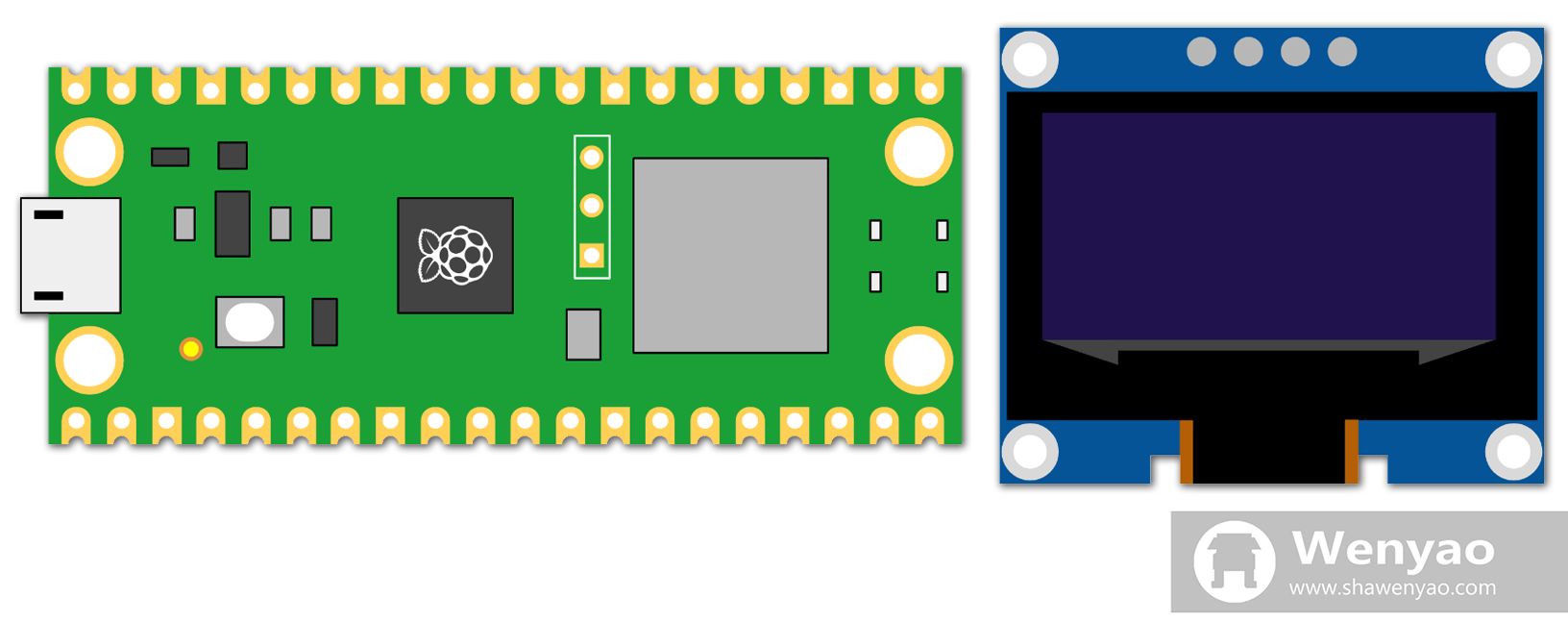
<p>There are many affordable options when it comes to adding a display to a Raspberry Pi. For example, this 0.96-inch one can be had for about <a href="https://www.amazon.com/gp/product/B09T6SJBV5/">$3 apiece</a>. It features an 128x64 OLED display and should provide enough screen real estate for all the important stuff to be rendered on a single screen. For a detail instruction on how to use the display, <a href="https://www.tomshardware.com/how-to/oled-display-raspberry-pi-pico">here</a> is an excellent guide from Tom’s Hardware.</p>

<div align="center">
  <img src="https://shawenyao.github.io/Photos/Raspberry Pi/picow&amp;oled.png" />
</div>

<p><em>Raspberry Pi Pico W and OLED display. Left: Raspberry Pi Pico W; right: 128x64 OLED display. Image created by author on Google Slides.</em></p>

<h2 id="getting-real-time-departure-estimates">Getting Real-Time Departure Estimates</h2>

<p>BART offers real-time departure estimates via its <a href="https://api.bart.gov/">API</a>. A simple HTTPS request to:</p>

<div class="language-plaintext highlighter-rouge"><div class="highlight"><pre class="highlight"><code>https://api.bart.gov/api/etd.aspx?cmd=etd&amp;orig={station}&amp;dir={direction}&amp;key={key}&amp;json=y
</code></pre></div></div>

<p>will result in a list of incoming trains for a given station in a given direction being returned. This would have been a breeze if not for one caveat. For some reason, the official <code class="language-plaintext highlighter-rouge">urequests</code> library that comes with the MicroPython firmware has HTTP/1.0 hardcoded. Cloudflare, by which the domain <code class="language-plaintext highlighter-rouge">bart.gov</code> is protected, doesn’t like it very much and will instantly shut down any connection attempt as such. This calls for a modification in the <code class="language-plaintext highlighter-rouge">request()</code> function in <code class="language-plaintext highlighter-rouge">urequests</code>. Thankfully, after playing with the script, I realize that the fix could be something as simple as changing <a href="https://github.com/micropython/micropython-lib/blob/master/python-ecosys/urequests/urequests.py#L94">line 94</a> from:</p>

<div class="language-python highlighter-rouge"><div class="highlight"><pre class="highlight"><code><span class="n">s</span><span class="p">.</span><span class="n">write</span><span class="p">(</span><span class="sa">b</span><span class="s">"%s /%s HTTP/1.0</span><span class="se">\r\n</span><span class="s">"</span> <span class="o">%</span> <span class="p">(</span><span class="n">method</span><span class="p">,</span> <span class="n">path</span><span class="p">))</span>
</code></pre></div></div>

<p>to:</p>

<div class="language-python highlighter-rouge"><div class="highlight"><pre class="highlight"><code><span class="n">s</span><span class="p">.</span><span class="n">write</span><span class="p">(</span><span class="sa">b</span><span class="s">"%s /%s HTTP/1.1</span><span class="se">\r\n</span><span class="s">"</span> <span class="o">%</span> <span class="p">(</span><span class="n">method</span><span class="p">,</span> <span class="n">path</span><span class="p">))</span>
</code></pre></div></div>

<p>in addition to a few touches at the end to parse the JSON response correctly.</p>

<h2 id="controlling-text-sizes">Controlling Text Sizes</h2>

<p>Without an operating system, changing text fonts or sizes isn’t as straightforward. To solve the problem, Peter Hinch has developed a wonderful <a href="https://github.com/peterhinch/micropython-font-to-py">solution</a>, which to my understanding involves some sort of character-by-character bitmap of the font that are cleverly encoded in a bytearray form. Once the <code class="language-plaintext highlighter-rouge">Writer</code> class is initialized with such bytearray:</p>

<div class="language-python highlighter-rouge"><div class="highlight"><pre class="highlight"><code><span class="c1"># various fonts
</span><span class="n">font6_writer</span> <span class="o">=</span> <span class="n">writer</span><span class="p">.</span><span class="n">Writer</span><span class="p">(</span><span class="n">oled</span><span class="p">,</span> <span class="n">font6</span><span class="p">,</span> <span class="n">verbose</span><span class="o">=</span><span class="bp">False</span><span class="p">)</span>
<span class="n">font10_writer</span> <span class="o">=</span> <span class="n">writer</span><span class="p">.</span><span class="n">Writer</span><span class="p">(</span><span class="n">oled</span><span class="p">,</span> <span class="n">font10</span><span class="p">,</span> <span class="n">verbose</span><span class="o">=</span><span class="bp">False</span><span class="p">)</span>
<span class="n">courier20_writer</span> <span class="o">=</span> <span class="n">writer</span><span class="p">.</span><span class="n">Writer</span><span class="p">(</span><span class="n">oled</span><span class="p">,</span> <span class="n">courier20</span><span class="p">,</span> <span class="n">verbose</span><span class="o">=</span><span class="bp">False</span><span class="p">)</span>
</code></pre></div></div>

<p>it can then be used to print any arbitrary text to the OLED screen:</p>

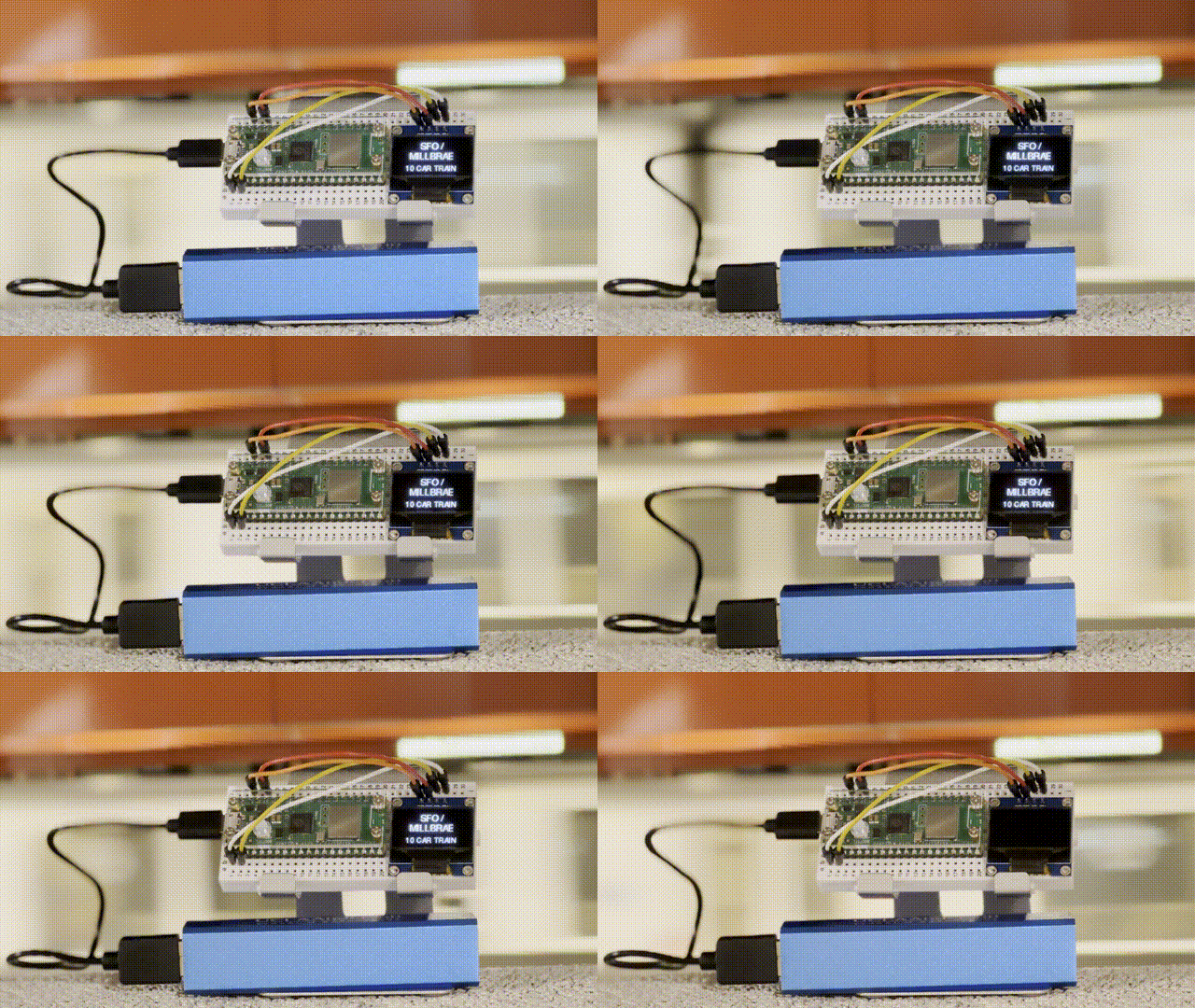
<p float="left" align="middle">
  <img src="https://shawenyao.github.io/Photos/BART-OLED/arriving.jpg" width="48%" />
  <img src="https://shawenyao.github.io/Photos/BART-OLED/schedule.jpg" width="48%" /> 
</p>

<p><em>An OLED screen displaying texts in different font sizes. Left: train arriving; right: estimated wait time.</em></p>

<h2 id="displaying-time">Displaying Time</h2>

<p>A Raspberry Pi Pico W doesn’t have an internal battery to keep the clock running constantly, so we will need an authority to tell time upon boot up. This requires a call to <code class="language-plaintext highlighter-rouge">worldtimeapi.org</code>, where it will automatically deal with time zone conversion depending on the user’s IP:</p>

<div class="language-plaintext highlighter-rouge"><div class="highlight"><pre class="highlight"><code>https://worldtimeapi.org/api/ip
</code></pre></div></div>

<p>or fix the time zone with something like:</p>

<div class="language-plaintext highlighter-rouge"><div class="highlight"><pre class="highlight"><code>https://worldtimeapi.org/api/timezone/America/Los_Angeles
</code></pre></div></div>

<p>The response contains a JSON with all the information necessary to set the initial value of the onboard real time clock on a Raspberry Pi Pico W.</p>

<div class="language-python highlighter-rouge"><div class="highlight"><pre class="highlight"><code><span class="c1"># set initial time based on worldtimeapi.org
</span><span class="n">rtc</span> <span class="o">=</span> <span class="n">machine</span><span class="p">.</span><span class="n">RTC</span><span class="p">()</span>
<span class="n">rtc</span><span class="p">.</span><span class="n">datetime</span><span class="p">((</span><span class="n">year</span><span class="p">,</span> <span class="n">month</span><span class="p">,</span> <span class="n">day</span><span class="p">,</span> <span class="n">weekday</span><span class="p">,</span> <span class="n">hours</span><span class="p">,</span> <span class="n">minutes</span><span class="p">,</span> <span class="n">seconds</span><span class="p">,</span> <span class="n">subseconds</span><span class="p">))</span>
</code></pre></div></div>

<p>After initialization, <code class="language-plaintext highlighter-rouge">rtc.datetime()</code> will return the current date and time.</p>

<p float="left" align="middle">
  <img src="https://shawenyao.github.io/Photos/BART-OLED/clock.jpg" width="48%" />
</p>

<p><em>An OLED screen displaying a digital clock.</em></p>

<h2 id="putting-it-all-together">Putting It All Together</h2>

<video src="https://shawenyao.github.io/Photos/BART-OLED/demo.mp4" controls="controls" width="100%"></video>

<p><em>BART Platform Sign Portable in action, train arriving.</em></p>

<h2 id="appendix">Appendix</h2>
<h3 id="try-it-yourself">Try It Yourself</h3>
<p><a href="https://github.com/shawenyao/bart-oled">https://github.com/shawenyao/bart-oled</a></p>

<p><br /></p>

<p>Update October 12, 2023: As of September 2023, <a href="https://www.bart.gov/about/projects/legacy">legacy BART trains</a> (the ones with 2 doors per car instead of 3) are no longer in service. As a result, where it used to say “2-door” or “3-door” on the platform sign now displays the color of the line.</p>]]></content><author><name></name></author><category term="raspberry pi" /><category term="smart home" /><category term="python" /><summary type="html"><![CDATA[An authentic, desktop BART experience.]]></summary></entry><entry><title type="html">A Distributed Motion-Controlled Lighting System</title><link href="https://www.shawenyao.com/A-Distributed-Motion-Controlled-Lighting-System/" rel="alternate" type="text/html" title="A Distributed Motion-Controlled Lighting System" /><published>2023-01-09T00:00:00+00:00</published><updated>2023-01-09T00:00:00+00:00</updated><id>https://www.shawenyao.com/A-Distributed-Motion-Controlled-Lighting-System</id><content type="html" xml:base="https://www.shawenyao.com/A-Distributed-Motion-Controlled-Lighting-System/"><![CDATA[<p>Fiat lux.</p>

<div align="center">
  <img src="https://shawenyao.github.io/Photos/Raspberry Pi/4b&amp;picow.png" />
</div>

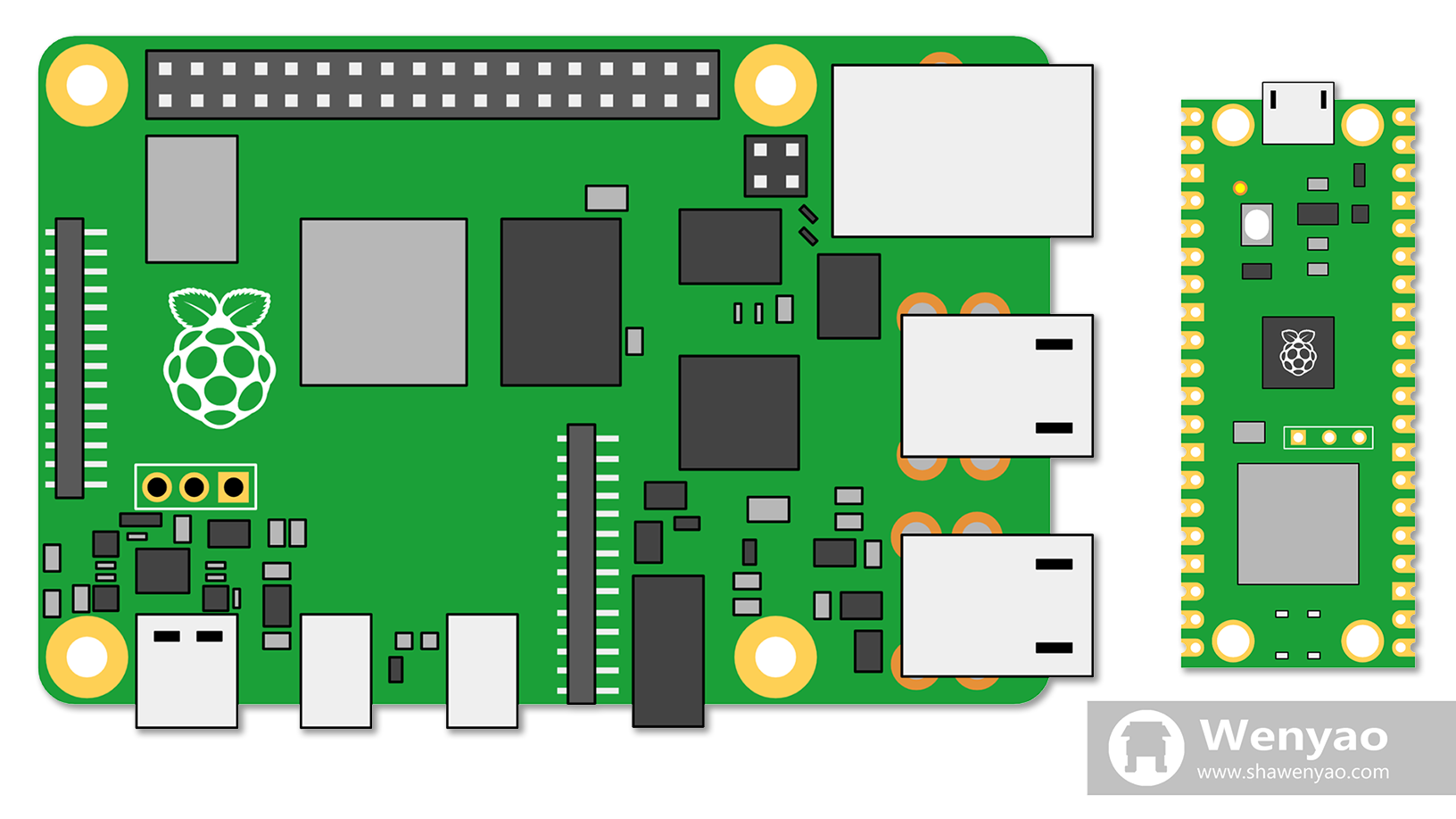
<p><em>Image created by author on Google Slides. Left: Raspberry Pi 4 Model B; right: Raspberry Pi Pico W.</em></p>

<p><br /></p>

<p>I have been looking for the optimal, most hassle-free way to control my stairs light. The electrical engineers who helped design the apartment apparently have put a great deal of thought into it, too. The dome light above the stairs can be turned on or off by two switches on both ends in an “<a href="https://en.wikipedia.org/wiki/Exclusive_or">exclusive or (XOR)</a>” fashion. The intention, if I may speculate, is for the users to flip one switch (when going either up or down) to turn the light on, than the other (when finished) to turn it off. This is fine for most use cases, but it’s not difficult to think of a few occasions where a handsfree approach would be preferred. While <a href="https://www.shawenyao.com/Voice-Controlled-Raspberry-Pi/">voice control</a> already works decently well, a motion-controlled solution is arguably the more natural way of interacting with the light in this case. The system should be able to monitor movement on the stairs, switching the light on or off accordingly. High energy efficiency would be a nice feature as well, so it can last for days on a power bank. Ideally, I would also like to have on-the-fly configurability without rewiring, and some degree of resistance to unintended distractions (yes, I am looking at my <a href="https://www.shawenyao.com/Cat-in-Black/">cat</a>).</p>

<h2 id="smart-home-basics">Smart Home Basics</h2>

<p>For this project, various <a href="https://en.wikipedia.org/wiki/Raspberry_Pi">Raspberry Pi</a> computers will be utilized. The 4th generation, Raspberry Pi 4 Model B, is by far the most powerful Raspberry Pi with a quad-core CPU clocking in at 1.5GHz. The newest entry to the Raspberry Pi family, Pico W, is a microcontroller capable of running <a href="[https://en.wikipedia.org/wiki/MicroPython](https://micropython.org/)">MicroPython</a> and accessing the Internet, and will be serving as the bridge between the main Raspberry Pi unit and the motion sensor.</p>

<p>Smart plugs are next. Essentially, they are Wi-Fi-enabled switches that can be turned on or off via an API call, rendering “non-smart” devices such as a floor lamp “smart”. For example, TP-Link offers many choices under the brand <a href="https://www.kasasmart.com/us/products/smart-plugs">Kasa</a>. Programmatic control of the Kasa smart plugs is made possible by the <a href="https://github.com/python-kasa/python-kasa">python-kasa</a> library.</p>

<p>Last but certainly not least, there’s the motion sensor itself. The HC-SR505 sensor, a type of <a href="https://en.wikipedia.org/wiki/Passive_infrared_sensor">passive infrared (PIR) sensor</a> for instance, can get the job done nicely.</p>

<h2 id="design-1-motion-sensing-101">Design 1: Motion Sensing 101</h2>

<div align="center">
  <img src="https://shawenyao.github.io/Photos/Light/1.png" />
</div>

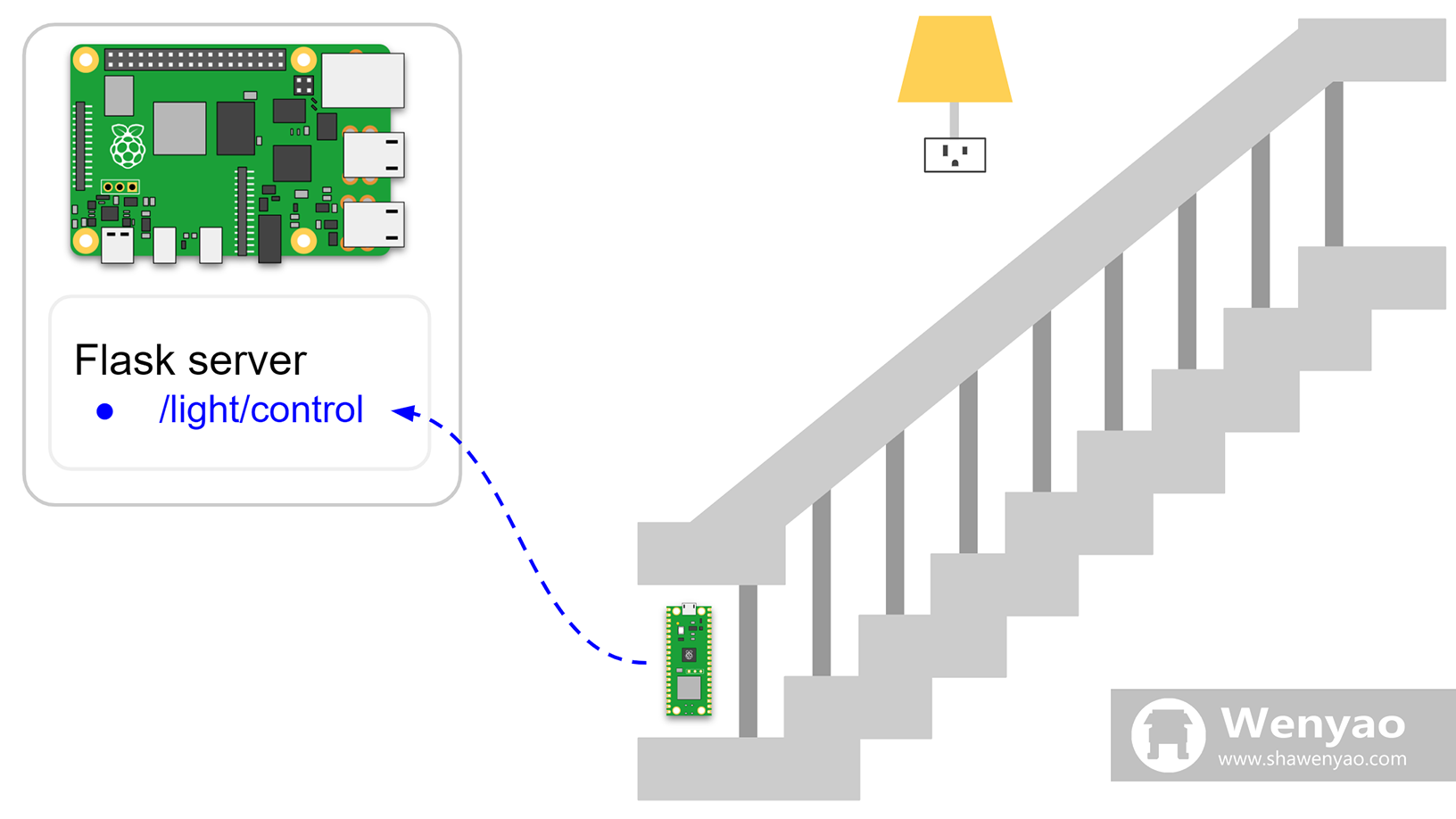
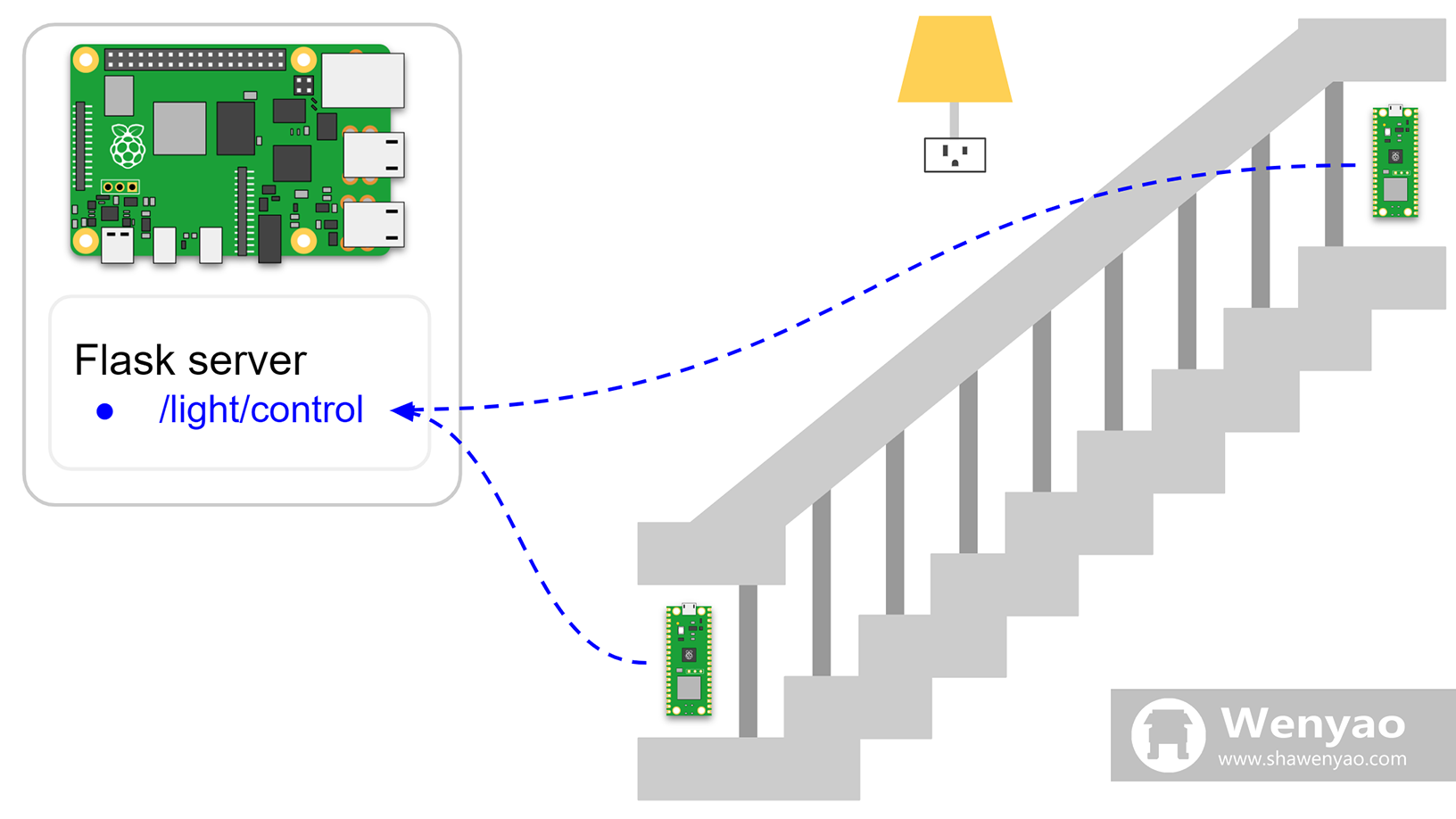
<p>The most straightforward solution is probably a two-Pi system. The first unit, a Pico W connected to a PIR motion sensor and placed at the bottom of the stairs, is responsible for detecting motion. If and when it does, the microcontroller sends a signal wirelessly to the second unit, a Raspberry Pi 4 listening to such request via a <a href="https://flask.palletsprojects.com/">Flask</a> server, who then turns the light on, waits a bit and switches it off. A detailed guide on how to make a Pico work with a HC-SR505 sensor can be found on <a href="https://www.freva.com/pir-motion-sensor-on-a-raspberry-pi-pico/">freva.com</a>.</p>

<p>From a human-machine interface standpoint, anyone who wishes to go upstairs simply need to proceed as usual. The action will be captured at the very beginning of the climb so lighting will hopefully be available for the majority of the journey. The duration of the light is controlled by the server side and should be reasonably long (say a minute) to allow sufficient time for climbing before darkness falls again. When it times out, the server tells the light to power off - again, no human intervention needed.</p>

<p>Additionally, it’s worth noting that the second Pi is a must currently because the MicroPython environment available on the Pico W has yet to provide official support for the python-kasa library. This is not necessarily a bad thing. In fact, it must be taken into account that upgrading code on a Raspberry Pi Pico W is quite troublesome. It requires physically connecting the board to a computer, launching an editor, editing and saving. Therefore, it’s advisable to keep the logic on the Pico W as simple and generic as possible, and leave the more complicated part to the more powerful (and better-supported) Raspberry Pi 4.</p>

<h2 id="design-2-distributed-motion-sensors">Design 2: Distributed Motion Sensors</h2>

<div align="center">
  <img src="https://shawenyao.github.io/Photos/Light/2.png" />
</div>

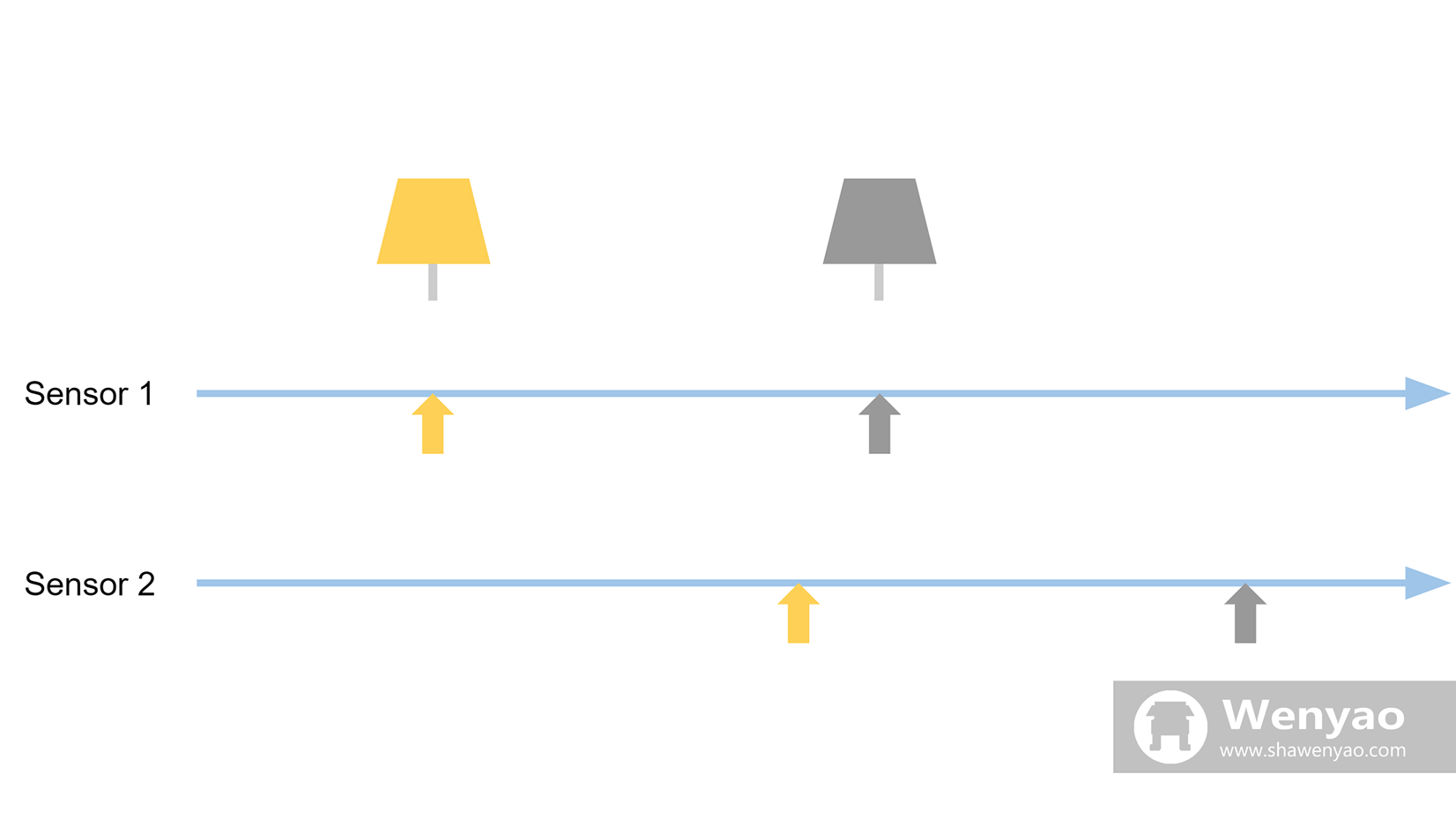
<p>Now, the light turns on when I go upstairs - that’s all good. But sooner or later, I might have to come downstairs and wish the light turned on as well. So comes a third unit, another Raspberry Pico W placed at the top of the stairs. Everything that worked before should continue to work with the same setup and the same code, only that now there are two triggers. When I go upstairs, the bottom sensor detects me and turns on the light. Granted, in a few seconds, the sensor upstairs also sees me and wants to turn on the light, but it doesn’t matter as the light is already on (and vice versa). Moreover, the system can scale easily. Any number of additional Pico Ws/PIR sensors can be added or removed without any major effort.</p>

<div align="center">
  <img src="https://shawenyao.github.io/Photos/Light/problem.png" />
</div>

<p>There is a problem with such design, however. The fact that the two sensors work <em>independently</em> and <em>memorylessly</em> brings a serious downside. If I decide to stay on the stairs, there’s no way for the system to extend the duration of the lighting. For example, after my movement is picked up by the first sensor, the light is set to stay on for a predetermined amount of time (however generous that amount is). Even if another sensor (or the same one, for the matter) detects any further motion, its signal will be useless since it merely tries to turn on a light that is already on, or off when it’s already off. The inconvenience calls for a new round of upgrade.</p>

<h2 id="design-3-coordinating-the-sensors">Design 3: Coordinating the Sensors</h2>

<div align="center">
  <img src="https://shawenyao.github.io/Photos/Light/3.png" />
</div>

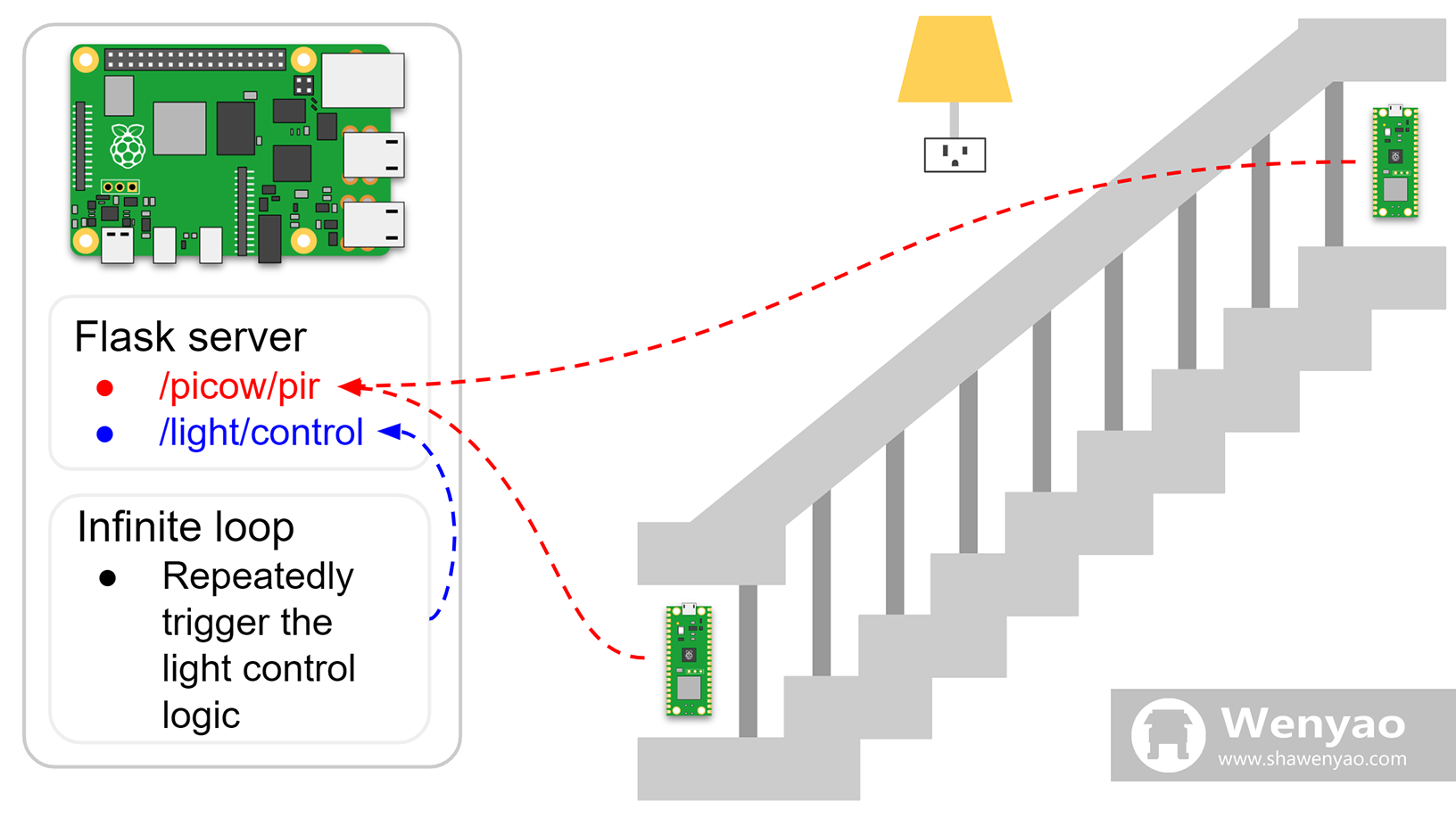
<p>In the final design, the two Pico Ws no longer assume to role of triggering the logic to control the light. Instead, they focus on one thing and one thing alone: sending the signals detected by the PIR sensor to the server. The server logs the timestamp at which the last motion is reported. A new process on the Raspberry Pi 4, an infinite loop, repeatedly triggers a piece of logic that compares the current time with the timestamp of last motion. If the difference is within the duration for which the light is meant to be turned on but the light happens to be off, it turns the light on. If the difference is greater than the duration but the light is on, it turns it off. In other words, the system has <em>memory</em> now. As a result, any detected motion will reset the countdown to lights out, enabling a much more intuitive user experience.</p>

<h2 id="putting-it-all-together">Putting It All Together</h2>

<div align="center">
  <img src="https://shawenyao.github.io/Photos/Light/demo.gif" style="width:100%;height:auto;" />
</div>

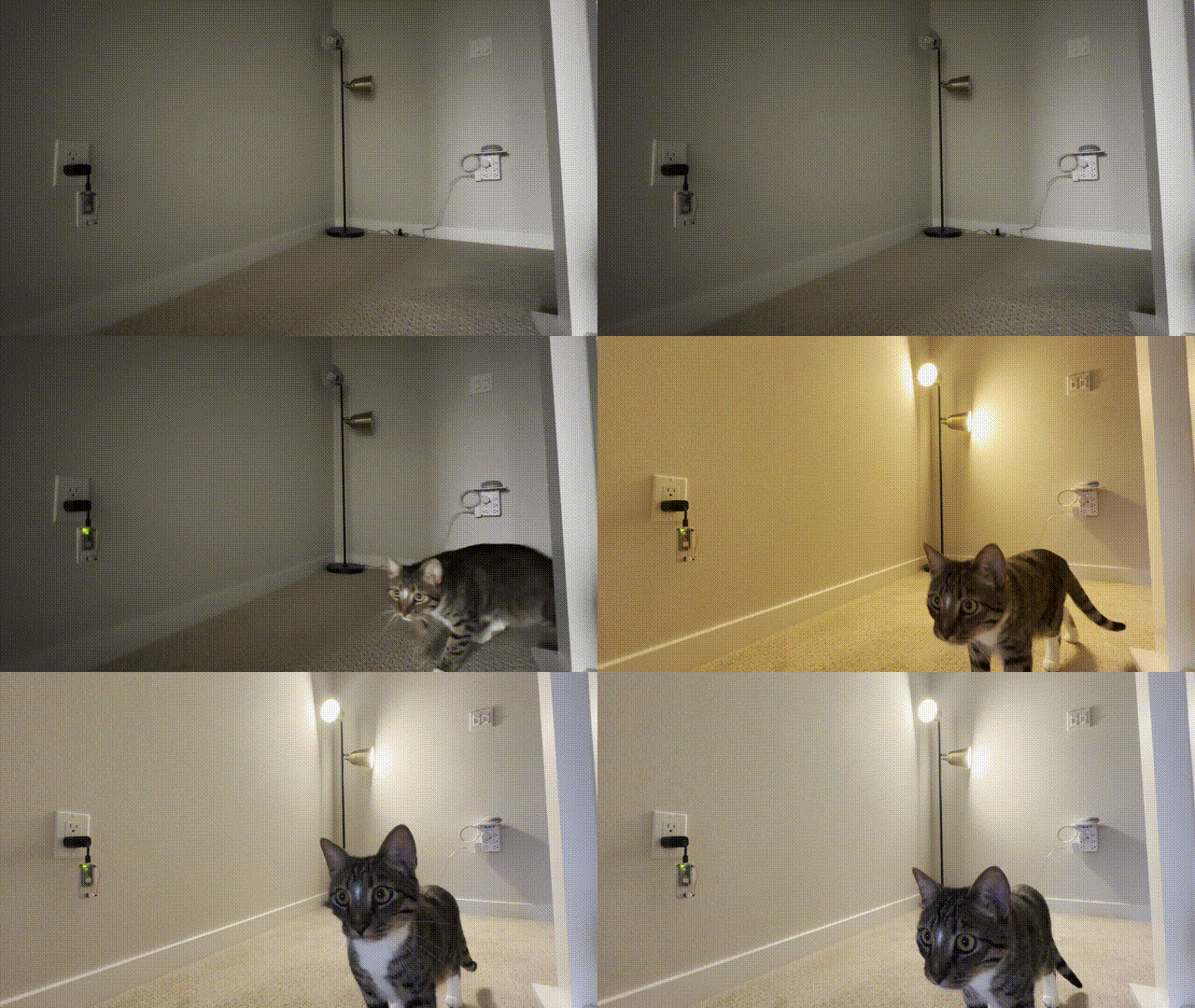
<p>From my own experience using it, the PIR sensor proves to be sensitive enough to any real human movement (true positive). On the contrary, stairs light randomly turning on, especially at night, has become a bigger concern. Is it the cat? Should I call 911? Or, could it simply be a false positive? None of which can be called a pleasant thought at 2 a.m. The issue haunted me for a couple of nights, until -</p>

<h2 id="life-hacks">Life Hacks</h2>

<div align="center">
  <img src="https://shawenyao.github.io/Photos/Light/hack.jpg" />
</div>

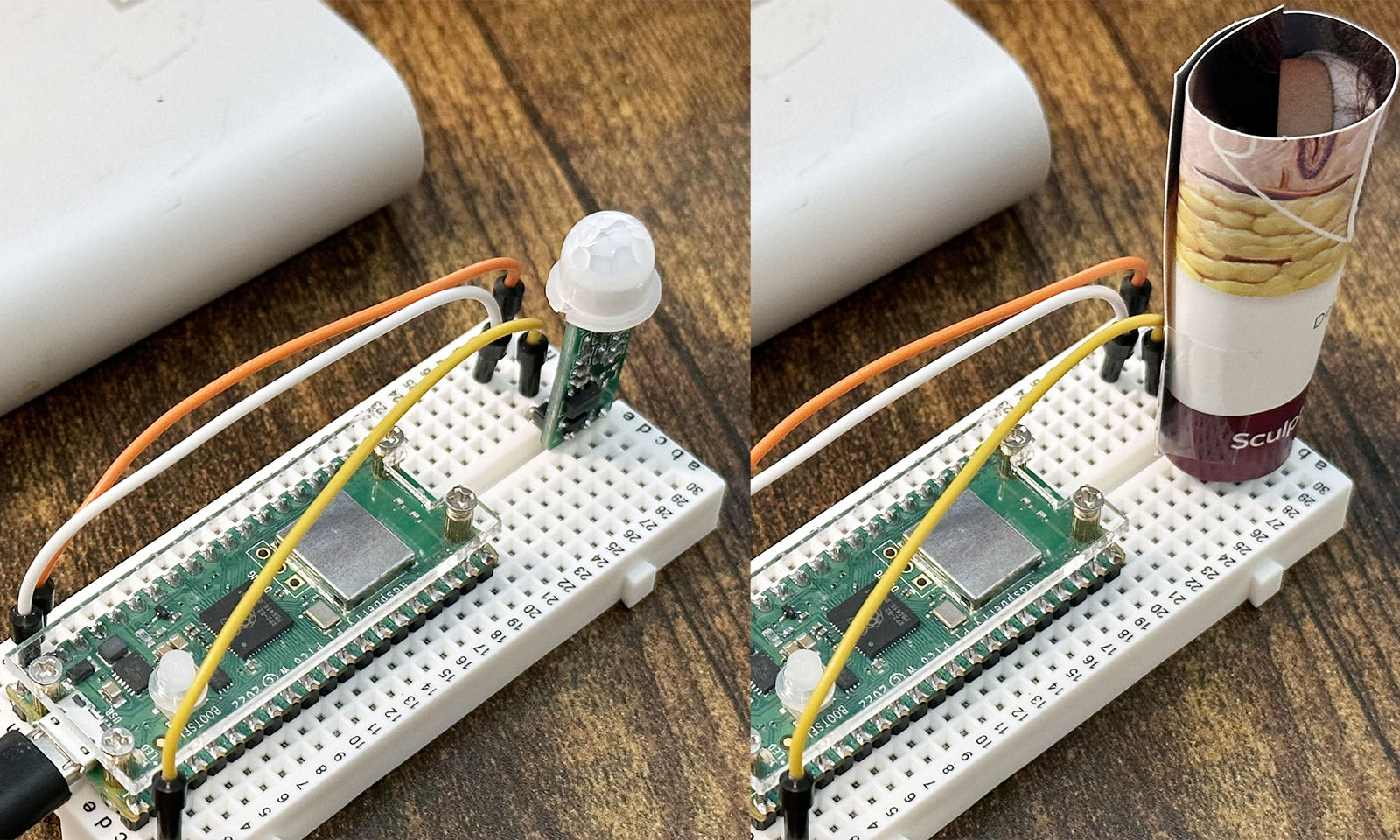
<p><em>Left: Raspberry Pi Pico W and HC-SR505 sensor; right: Raspberry Pi Pico W and HC-SR505 sensor with a scroll of paper.</em></p>

<p>To my great surprise, a simple scroll of paper works wonders at getting rid of the false alarms, by virtue of limiting the range of the sensor’s visibility. Furthermore, ever since I accidentally left it pointing upward, the system has literally turned a blind eye to my cat’s loitering, an unexpected yet delightful side effect that brings closure to this matter.</p>

<h2 id="appendix">Appendix</h2>
<h3 id="try-it-yourself">Try It Yourself</h3>
<p><a href="https://github.com/shawenyao/light">https://github.com/shawenyao/light</a></p>]]></content><author><name></name></author><category term="raspberry pi" /><category term="smart home" /><category term="python" /><summary type="html"><![CDATA[Fiat lux.]]></summary></entry><entry><title type="html">Cat in Black</title><link href="https://www.shawenyao.com/Cat-in-Black/" rel="alternate" type="text/html" title="Cat in Black" /><published>2022-12-31T00:00:00+00:00</published><updated>2022-12-31T00:00:00+00:00</updated><id>https://www.shawenyao.com/Cat-in-Black</id><content type="html" xml:base="https://www.shawenyao.com/Cat-in-Black/"><![CDATA[<p>They say time spent with cats is never wasted.</p>

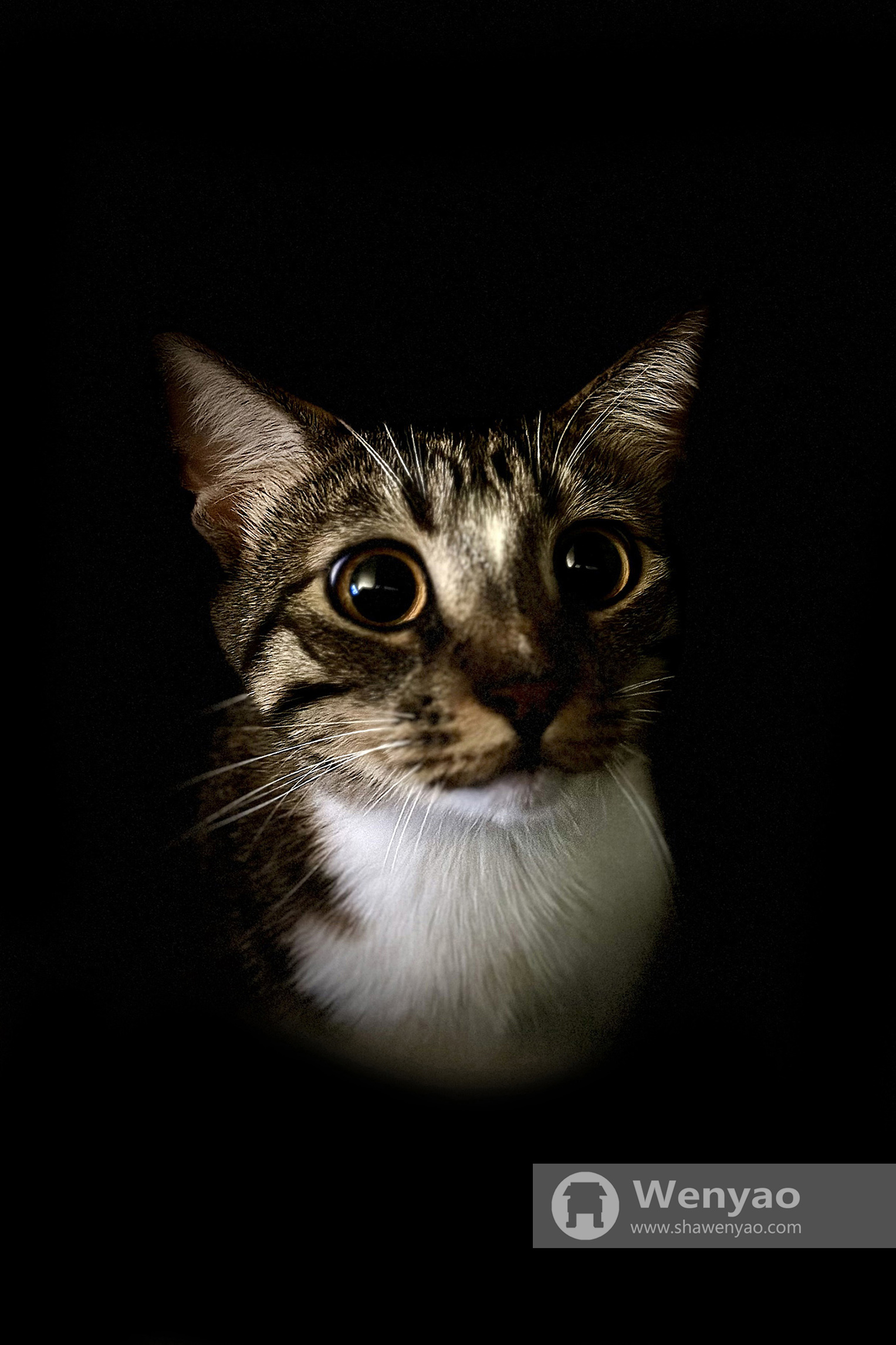
<div align="center">
  <img src="https://shawenyao.github.io/Photos/IMG_0584.jpg" />
</div>]]></content><author><name></name></author><category term="photography" /><summary type="html"><![CDATA[They say time spent with cats is never wasted.]]></summary></entry></feed>